Even the best artists struggle to show us what real-world objects
look like in all their three-dimensional (3D) glory. Most of the time
that doesn't matter—looking at a photo or sketch gives us a
good-enough idea. But if you're in the business of developing new
products and you need to show them off to clients or customers,
nothing beats having a prototype: a model you can touch, hold, and
feel. Only trouble is, models take ages to make by hand and
machines that can make "rapid prototypes" cost a fortune (up to a
half million dollars).
[1]
Hurrah, then for 3D printers, which work a bit
like inkjets and build up 3D models layer by layer at up to 10 times
the speed and a fifth the cost.
[2]
How exactly do they work? Let's take
a closer look!
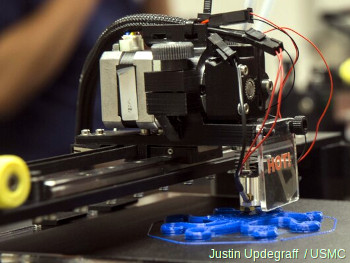
Photo: 3D printing in action: this is the printhead of an Invent3D printer,
slowly building up an object, layer by layer, by squirting molten blue plastic out of its precisely moving nozzle.
Photo by Cpl. Justin Updegraff courtesy of US Marine Corps.
Before there were such things as computer-aided design (CAD) and
lasers, models and prototypes were laboriously carved from wood or
stuck together from little pieces of card or plastic. They could take
days or even weeks to make and typically cost a fortune. Getting
changes or alterations made was difficult and time-consuming,
especially if an outside model-making company was being used, and
that could discourage designers from making improvements or taking
last-minute comments onboard: "It's too late!"
With the arrival of better technology,
an idea called rapid prototyping (RP) grew up during the 1980s
as a solution to this problem: it means developing models and
prototypes by more automated methods, usually in hours or days rather
than the weeks that traditional prototyping used to take.
[3]
3D printing is a logical extension of this idea in which product designers make
their own rapid prototypes, in hours, using sophisticated machines
similar to inkjet printers.
Photo: A high-quality rapid prototype of a space plane made in wax
from a CAD drawing by NASA. Photo courtesy of NASA Langley Research Center (NASA-LaRC) and Internet Archive.
Sponsored links
How does a 3D printer work?
Photo: A typical mid-range 3D printer from Stratasys
(it's a uPrint SE Plus). Photo by John J. Moore courtesy of US Army and DVIDS.
Imagine building a conventional wooden prototype of a car. You'd
start off with a block of solid wood and carve inward, like a
sculptor, gradually revealing the object "hidden" inside. Or if
you wanted to make an architect's model of a house, you'd construct
it like a real, prefabricated house, probably by cutting miniature
replicas of the walls out of card and gluing them together. Now a
laser could easily carve wood into shape and it's not beyond the
realms of possibility to train a robot to stick cardboard
together—but 3D printers don't work in either of these ways!
A typical 3D printer is very much like an inkjet printer operated
from a computer. It builds up a 3D model one layer at a time, from
the bottom upward, by repeatedly printing over the same area in a method known as
fused depositional modeling (FDM).
Working entirely automatically, the printer creates a model over a period of hours by turning a 3D CAD
drawing into lots of two-dimensional, cross-sectional
layers—effectively separate 2D prints that sit one on top of
another, but without the paper in between. Instead of using ink, which would never build up to much
volume, the printer deposits layers of molten plastic or powder and
fuses them together (and to the existing structure) with adhesive or ultraviolet light.
Artwork: One of the world's first three-dimensional FDM printers,
developed by S. Scott Crump in the 1980s. In this design, the model (pink, 40) is printed
on a baseplate (dark blue, 10) that moves in the horizontal (X–Y) directions, while the print
head and nozzle (2 and 4, orange) move in the vertical (Z) direction. The raw material for printing comes from a plastic rod (yellow, 46), melted by the print head. The heating process is carefully regulated by a
thermocouple (electrical heat sensor) connected to a temperature controller (purple, 86). The rod is extruded using compressed air from the large tank and
compressor on the right (green, 60/62). Things have changed a bit since then, but the basic principle (of building up an object by melting and depositing plastic under three-dimensional control) remains the same. Artwork from US Patent 5,121,329: Apparatus and method for creating three-dimensional objects by S. Scott Crump, Stratasys Ltd, June 9, 1992, courtesy of US Patent and Trademark Office.
Q: What kind of "ink" does a 3D printer use? A: Plastic!
Where an inkjet printer sprays liquid ink and a laser printer uses solid powder, a 3D printer uses neither: you can't build a 3D model by piling up colored water or black dust! What you can model with is
plastic.
A 3D printer essentially works by extruding molten plastic through a tiny nozzle that it moves around precisely under computer
control. It prints one layer, waits for it to dry, and then prints the next layer on top. Depending on the quality
of the printer, what you get is either a stunning looking 3D model or a lot of 2D lines of plastic sitting crudely on top of one another—like badly piped cake icing! The plastic from which models are printed is obviously hugely important.
Photo: A Lulzbot 3D printer. You can see the little reel of raw, red plastic
(the "filament") that feeds into the print head from the top. Photo by Stephane Belcher courtesy of
US Navy.
When we talk about plastic, we generally mean "plastics": if you're a diligent recycler, you'll know there are many types of plastic, all of which are different, both chemically (in their molecular makeup) and physically (in the way they behave toward heat, light, and so on).
It's hardly surprising that 3D printers use thermoplastics (plastics that melt when you heat them and turn solid when you cool them back down), and typically either ABS (acrylonitrile butadiene styrene), PLA (polylactic acid), or PETG (polyethylene gerephthalate glycol).
Perhaps most familiar as the material from which LEGO® bricks are made, ABS is also widely used in car interiors (sometimes in outside parts such as hubcaps too), for making the insides of refrigerators, and in plastic computer parts (it's quite likely the mouse and keyboard you're using right now are made from ABS plastic). So why is this material used for 3D printing? It's really a composite of a hard, tough plastic (acrylonitrile) with a synthetic rubber (butadiene styrene). It's perfect for 3D printing because it's a solid at room temperatures and melts at a little over 100°C (220°F), which is cool enough to melt inside the printer without too much heat and hot enough that models printed from it won't melt if they're left in the Sun. Once set, it can be sanded smooth or painted; another useful property of ABS is that it's a whiteish-yellow color in its raw form, but pigments (the color chemicals in paint) can be added to make it virtually any color at all. According to the type of printer you're using, you feed it the plastic either in the form of small pellets or filaments (like plastic strings).
PLA is easier to use than ABS and a little more environmentally friendly, though it's softer and less durable. PETG is a halfway house, closer to the strength of ABS, easy to shape, and relatively easy to recycle.
You don't necessarily need to print in 3D with plastic: in theory, you can print objects using any molten material that hardens and sets reasonably quickly. In July 2011, researchers at
England's Exeter University unveiled a prototype food printer that could print 3D objects using molten chocolate!
Makers of 3D printers claim they are up to 10 times faster than
other methods and 5 times cheaper, so they offer big advantages for
people who need rapid prototypes in hours rather than days. Although
high-end 3D printers are still expensive (typically about $25,000–$50,000), they're
a fraction the cost of more sophisticated RP machines (which come in
at $100,000–$500,000), and vastly cheaper machines are
also available (you can buy kit-form printers for just a few hundred dollars).
[4]
They're also reasonably small, safe, easy-to-use, and
reliable (features that have made them increasingly popular in places such as
design/engineering schools).
Photo: A B9Creator™—a typical low-end, DIY 3D printer.
It was originally available in kit form, priced at $2495.
B9's printers now come ready-assembled in the $10,000–25,000
price range. Photo by courtesy of Windell H. Oskay, www.evilmadscientist.com,
published on Flickr in 2012
under a Creative Commons Licence.
On the downside, the finish of the models they produce is usually
inferior to those produced with higher-end RP machines. The choice of
materials is often limited to just one or two, the colors may be crude,
and the texture may not reflect the intended finish of the product very well. Generally, then, 3D-printed models
may be better for rough, early visualizations of new products; more
sophisticated RP machines can be used later in the process when
designs are closer to finalization and things like accurate surface
texture are more important.
Photo: A high-end Xerox ElemX 3D Liquid Metal Printer, which is designed
to print new or replacement metal components using aluminum alloy. Photo by Lenny Weston courtesy of US Navy and DVIDS.
Sponsored links
Applications
What can you use a 3D printer for? It's a bit like asking "How
many ways can you use a photocopier?" In theory, the only limit is your
imagination. In practice, the limits are the accuracy of the
model from which you print, the precision of your printer, and the
materials you print with. Modern 3D printing was invented over 30 years ago,
but it's only really started to take off in the last couple of decades.
[5]
Much of the technology is still relatively new; even so, the range of uses for 3D printing
is pretty astonishing.
Medicine
Photo: 3D-printed plastic hearts make it possible for surgeons to practise operations with no risk.
Model by Dr. Matthew Bramlet. Public domain photo published on Flickr courtesy of US NIH Image Gallery and 3D Print Exchange.
Life's a one-way journey; fallible, aging humans with creasing,
crumbling bodies naturally see great promise in a technology that has
the potential to create replacement body parts and tissue. That's why
doctors were among the earliest people to explore 3D printing. Already, we've
seen 3D printed ears (from Indian company Novabeans), arms and legs
(from Limbitless Solutions, Biomechanical Robotics Group, and
Bespoke), and muscles (from Cornell University). 3D printers have
also been used to produce artificial tissue (Organovo), cells
(Samsara Sciences), and skin (in a partnership between cosmetics
giant L'Oreal and Organovo). Although we're some way away from having
complete 3D printed replacement organs (such as hearts and livers),
things are rapidly moving in that direction. One project, known as
the Body on a Chip,
run by the Wake Forest Institute for Regenerative Medicine in North Carolina,
prints miniature human hearts, lungs, and blood vessels, places them on a microchip, and tests them out with a kind
of artificial blood.
Apart from replacement body parts, 3D printing is increasingly being
used for medical education and training. At Nicklaus Children's
Hospital in Miami, Florida, surgeons practise surgery on
3D-printed replicas of children's hearts. Elsewhere, the same
technique is used to rehearse brain surgery.
Aerospace and defense
Designing and testing airplanes is a complex and expensive business: a Boeing
Dreamliner has about 2.3 million components inside it! Although
computer models can be used to test quite a few aspects of how planes
behave, accurate prototypes still need to be made for things like
wind-tunnel testing. And 3D printing is a simple and effective way to
do that. While commercial airplanes are built in quantity, military
planes are more likely to be highly customized—and 3D printing
makes it possible to design, test, and manufacture low-volume or one-off parts both
quickly and cost-effectively.
Photo: The US Navy has been testing 3D printers on ships since
one was installed on USS Essex in 2014. In theory, an onboard printer makes a ship more self-reliant,
with less need to carry spare parts and materials, especially during wartime. This is a 3D-printed gear,
typical of the objects that might be printed during a mission at sea. Photo by Aaron Henson courtesy of US Marine Corps and
DVIDS.
Spacecraft are even more complex than airplanes and have the added
drawback that they are "manufactured" in tiny
quantities—sometimes only one is ever made. Instead of going to all the expense
of making unique tools and manufacturing equipment, it can make much
more sense to 3D print one-off components instead. But why even make
space parts on Earth? Shipping complex and heavy structures into
space is difficult, expensive, and time-consuming; the ability to
manufacture things on the Moon, or on other planets, could prove
invaluable. It's easy to imagine astronauts (or even robots) using 3D
printers to produce whatever objects they need (including spare
parts), far from Earth, whenever they need them. But even
conventional, Earth-spawned space projects can benefit from the
speed, simplicity, and low-cost of 3D printing. The latest, human-supporting
NASA Rover uses 3D-printed parts produced with help from Stratasys.
Photo: Spares and repairs are no problem. Closeup view of a Lulzbot Taz 6 3D printer being used to make spare parts onboard a US naval ship.
Photo by Christopher A. Veloicaza courtesy of US Navy and DVIDS.
Visualization
Making prototypes of airplanes or space rockets is an example of a
much broader use for 3D printing: visualizing how new designs will
look in three dimensions. We can use things like
virtual reality for
that, of course, but people often prefer things they can see and
touch. Increasingly, 3D printers are being used for rapid, accurate
architectural modeling. Although we can't (yet) 3D print in materials
such as brick and concrete, there's a wide range of plastics
available and they can be painted to look like realistic building
finishes. In the same way, 3D printing is also now widely used for
prototyping and testing industrial and consumer products. Since many
everyday things are molded from plastic, a 3D printed model can look
very similar to the finished product—perfect for focus-group
testing or market research.
Personalized products
From plastic toothbrushes to candy wrappers, modern life is
here-today, gone-tomorrow—convenient, inexpensive, and disposable.
Not everyone appreciates off-the-shelf mass production, however,
which is why expensive "designer labels" are so popular. In the
future, more of us are going to be able to enjoy the benefits of
affordable, highly personalized products custom-made to our exact
specification. Jewelry and fashion accessories are
already being 3D printed. Just as the Etsy website created a
worldwide community of artisan crafters, a few years ago, a startup called
Zazzy attempted to replicate
that using 3D printing technology. Thanks to simple online services like
Shapeways, anyone can make their own 3D printed nick-nacks, either for themselves or to
sell to other people without the expense and hassle of using their own 3D printer
(even Staples is now offering 3D printing services in some of its stores).
"Customized products" aren't simply things we buy and use: the
food we eat can fall into that category too. Cooking takes time,
skill, and patience, because preparing a mouthwatering
meal goes far beyond mixing ingredients and heating them on a stove.
Since most food can be extruded (squeezed through nozzles), it can
(theoretically) also be 3D printed. A few years ago,
Evil Mad
Scientist Laboratories playfully printed some weird objects out of
sugar. In 2013, New York Times
columnist A.J. Jacobs challenged himself to
print an entire meal—including the plate and cutlery. In the
process, he chanced upon the work of Cornell University's Hod Lipson,
who believes meals may one day be personally, 3D printed to match
your body's exact nutritional needs. Which brings us neatly to the future...
Photo: In theory, you can make 3D prints from any raw material you can feed into
your printer. Here are some fantastic 3D objects printed with granulated sugar
by a "CandyFab 4000" (a hacked old HP plotter) by the always entertaining folk
at Evil Mad Scientist Laboratories. Photo by courtesy of Windell H. Oskay, www.evilmadscientist.com, published on Flickr in 2007 under a Creative Commons Licence.
The future of 3D printing
Many people believe 3D printing will herald not merely a tidal wave
of brash, plastic gimmicks but a revolution in manufacturing industry
and the world economy that it drives. Although 3D printing will
certainly make it possible for us to make our own things, there's a
limit to what you can achieve by yourself with a cheap printer and a
tube of plastic. The real economic benefits are likely to arrive when
3D printing is universally adopted by big companies as a central
pillar of manufacturing industry. First, that will enable
manufacturers to offer much more customization of existing products,
so the affordability of off-the-shelf mass-production will be
combined with the attractiveness of one-off, bespoke artisan craft.
Second, 3D printing is essentially a robotic technology, so it will
lower the cost of manufacturing to the point where it will, once
again, be cost-effective to manufacture items in North America and
Europe that are currently being cheaply assembled (by poorly paid humans)
in such places as China and India. Finally, 3D printing will increase productivity
(since fewer people will be needed to make the same things), lowering
production costs overall, which should lead to lower prices and
greater demand—and that's always a good thing, for consumers, for
manufacturers, and the economy.
Photo: Two views of the printhead (sometimes called the "tool head") of a 3D printer.
Photos by Ashley McLaughlin courtesy of US Marine Corps. (Originals are
here
and here.)
About the author
Chris Woodford is the author and editor of dozens of science and technology books for adults and children, including DK's worldwide bestselling Cool Stuff series and Atoms Under the Floorboards, which won the American Institute of Physics Science Writing award in 2016. You can hire him to write books, articles, scripts, corporate copy, and more via his website chriswoodford.com.
3D Printing for Dummies by Richard Horne and Kalani Kirk Hausman. Wiley, 2017. An accessible, practical guide for complete beginners. The title is slightly misleading: much of the book is about building your own RepRap-type printer.
Fabricated: The New World of 3D Printing by Hod Lipson and Melba Kurman. John Wiley, 2013. A readable and accessible introduction to current and future applications of 3D printing.
Make: 3D Printing by Anna Kaziunas France. Maker Media, 2013. A clear and simple introduction; a good place to start.
Makers: The New Industrial Revolution by Chris Anderson. Random House, 2012. Explains how 3D printing will revolutionize small-scale manufacturing by empowering individual "makers."
Printing in Plastic: Build Your Own 3D Printer by Patrick Hood-Daniel and James Floyd Kelly. Apress, 2011. A hands-on way to learn about 3D printing, written very much in a practical, hobbyist style.
Articles
3-D Printing Grows Beyond Its Novelty Roots by Steve Lohr. The New York Times, July 3, 2022. Is 3D printing finally about to achieve its promise as a radical new form of manufacturing?
The disruptive future of printing: Technology commentator Bill Thompson considers a future where we can print solid 3D objects at the push of a button. From BBC News, 30 April 2010.
↑ For comparison purposes, at the time of updating this article, the Kocel AJS 800A rapid prototyping machine is about $450,000.
Stratasys 3D printers range in price from a few thousand to hundreds of thousands of dollars. Somewhere in the middle, the Stratasys J55 Color 3D printer costs around $100,000.
Please do NOT copy our articles onto blogs and other websites
Articles from this website are registered at the US Copyright Office. Copying or otherwise using registered works without permission, removing this or other copyright notices, and/or infringing related rights could make you liable to severe civil or criminal penalties.