Have you ever tried writing with a beam
of light? Sounds
impossible, doesn't it, but it's exactly what a laser printer does
when it makes a permanent copy of data (information) from your
computer on a piece of paper. Thanks to sci-fi and spy movies, we
tend to think of lasers as incredibly
powerful light beams
that can slice through chunks of metal or blast enemy spaceships into
smithereens. But tiny lasers are useful too in a much
more humdrum way: they read sounds and video clips off the discs in
CD and DVD players and they're
vital parts of most office computers printers. All set? Okay, let's take a closer look at how laser printers
work!
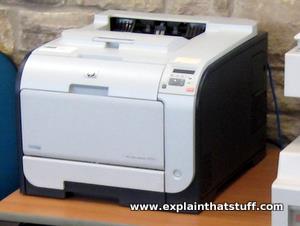
Photo: A compact laser printer doesn't look that different to an
inkjet printer, but it puts ink on the page in a completely different way.
An inkjet printer uses heat to squirt drops of wet ink from hot, syringe-like tubes, while a laser printer
uses static electricity to transfer a dry ink powder called toner.
Laser printers are a lot like photocopiers and use the same basic technology.
Indeed, as we describe later in this article, the first laser printers were
actually built from modified photocopiers. In a photocopier, a bright light is used to make an exact copy of a printed page. The light
reflects off the page onto a light-sensitive drum;
static electricity
(the effect that makes a balloon stick to your clothes if you rub it a
few times) makes ink particles stick to the drum; and the ink is then
transferred to paper and "fused" to its surface by hot
rollers. A laser printer works in almost exactly the same way, with
one important difference: because there is no original page to copy,
the laser has to write it out from scratch.
Imagine you're a computer packed full of data. The information you
store is in electronic format: each piece of data is stored
electronically by a microscopically small switching device called a
transistor. The printer's job is
to convert this electronic
data back into words and pictures: in effect, to turn electricity
into ink. With an inkjet printer,
it's easy to see how that
happens: ink guns, operated electrically, fire precise streams of ink
at the page. With a laser printer, things are slightly more complex.
The electronic data from your computer is used to control a laser
beam—and it's the
laser that gets the ink on the page, using static electricity in a
similar way to a photocopier.
Photo: Ink sticks to a laser printer's drum the way this balloon sticks to my pullover: using static electricity.
How a laser printer works
When you print something, your computer sends a vast stream of
electronic data (typically a few megabytes or million characters) to
your laser printer. An electronic circuit in the printer figures out
what all this data means and what it needs to look like on the page.
It makes a laser beam scan back and forth across a drum inside the
printer, building up a pattern of static electricity. The static
electricity attracts onto the page a kind of powdered ink called
toner. Finally, as in a photocopier, a fuser unit bonds the toner to
the paper.
Millions of bytes (characters) of data stream into the printer from your
computer.
An electronic circuit in the printer
(effectively, a small computer in its own right) figures out how to
print this data so it looks correct on the page.
The electronic circuit activates the corona
wire. This is a high-voltage wire that gives a static electric charge to
anything nearby.
The corona wire charges up the photoreceptor drum so the drum gains a
positive charge spread uniformly across its surface.
At the same time, the circuit activates the laser
to make it draw the image of the page onto the drum. The laser beam doesn't actually move: it
bounces off a moving mirror that scans it
over the drum. Where the laser beam hits the drum, it erases the positive charge that
was there and creates an area of negative charge instead.
Gradually, an image of the entire page builds up on the drum: where the
page should be white, there are areas with a positive charge; where the
page should be black, there are areas of negative charge.
An ink roller touching the photoreceptor drum coats it with tiny particles of powdered ink
(toner). The toner has been given a positive electrical charge, so it sticks to the
parts of the photoreceptor drum that have a negative charge (remember
that opposite electrical charges attract in the same way that opposite
poles of a magnet attract). No ink is attracted to the parts of the drum that have a positive
charge. An inked image of the page builds up on the drum.
A sheet of paper from a hopper on the
other side of the printer feeds up toward the drum. As it moves along,
the paper is given a strong negative electrical charge by another corona wire.
When the paper moves near the drum, its negative charge attracts
the positively charged toner particles away from the drum. The image is
transferred from the drum onto the paper but, for the moment, the toner
particles are just resting lightly on the paper's surface.
The inked paper passes through two hot rollers (the fuser unit). The heat and pressure from the
rollers fuse the toner particles permanently into the fibers of the paper.
The printout emerges from the side of the copier. Thanks to the fuser unit, the paper is still warm. It's
literally hot off the press!
Sponsored links
Who invented laser printers?
Until the early 1980s, hardly anyone had a personal or office computer; the few people who did made
"hardcopies" (printouts) with dot-matrix printers. These relatively slow
machines made a characteristically horrible screeching noise because they used a grid of tiny metal
needles, pressed against an inked ribbon, to form the shapes of letters, numbers, and symbols
on the page. They printed each character individually, line by line, at a typical speed of about 80 characters
(one line of text) per second, so a page would take about a minute to print. Although that sounds
slow compared to modern laser printers, it was a lot faster than most people could bash out letters
and reports with an old-style typewriter (the mechanical or electric keyboard-operated
printing machines that were used in offices for writing letters before affordable computers made them obsolete). You still occasionally see bills and address labels printed by dot-matrix; you can always tell because the print is relatively crude and made up of very visible dots. In the mid-1980s, as computers became more popular with small businesses, people wanted machines that could produce letters and reports as quickly as dot-matrix printers but with the same kind of print quality they could get from old-fashioned typewriters. The door was open for laser printers!
Photo: Dotty characters like this are a tell-tale sign of a dot-matrix printer at work.
Fortunately, laser-printing technology was already on the way. The first laser printers had been developed in the late 1960s by Gary Starkweather of Xerox, who based his work on the photocopiers that had made Xerox such a successful corporation. By the mid-1970s, Xerox was producing a commercial laser printer—a modified photocopier with images drawn by a laser—called the Dover, which could knock off about 60 pages a minute (one per second) and sold for the stupendous sum of $300,000. By the late 1970s, big computer companies, including IBM, Hewlett-Packard, and Canon, were competing to develop affordable laser printers, though the machines they came up with were roughly 2–3 times bigger than modern ones—about the same size as very large photocopiers.
Two machines were responsible for making laser printers into mass-market items. One was the
LaserJet, released by Hewlett-Packard (HP) in 1984 at a relatively affordable $3495. The other, Apple's LaserWriter, originally cost almost twice as much ($6995) when it was launched the following year to accompany the Apple Macintosh computer. Even so, it had a huge impact: the Macintosh was very easy to use and, with relatively inexpensive desktop-publishing software and a laser printer, it meant almost anyone could turn out books, magazines, and anything and everything else you could print onto paper. Xerox might have developed the technology, but it was HP and Apple who sold it to the world!
The first laser printer
Dipping into the archives of the US Patent and Trademark Office, I've found one of Gary Starkweather's original laser-printer designs, patented on June 7, 1977. To make it easier to follow, I've colored it in and annotated it more simply than the technical drawing in the original patent (if you wish, you can find the full details filed under
US Patent 4027961: Copier/Raster Scan Apparatus).
What we have is essentially a laser scanning unit (colored blue) sitting on top of a fairly conventional, large office
photocopier (colored red). In Starkweather's design, the laser scanner slides on and off the glass window of the photocopier
(the place where you would normally put your documents, face down), so the same machine can be used as either a laser printer
or a copier—anticipating all-in-one office machines by about 20–25 years.
The image is beamed through the glass copier window into the copier mechanism underneath.
The image is reflected by a mirror.
A lens focuses the image.
A second mirror reflects the image again.
The image is transferred onto the photocopier belt.
A developer unit converts the image into printable form.
The printable image is transferred to the paper.
The fuser permanently seals the image onto the page, which emerges into the collecting rack at top of the machine.
Are laser printers bad for you?
I used to share an office with someone who refused to share our office with a laser printer; we had to move our machine into a closet and keep the door shut tight. This kind of worry is far from rare, but is it simply superstition? As we saw up above, laser printers use a type of solid ink called toner, which can be a source of dusty, fine particulates (remember that sooty particulates, released by such things as car tailpipes, are one of the more worrying ingredients in urban air pollution). One
recent study found some printers emit nearly 10 billion particles per printed page (although it's important to note that the type and quantity of particle emissions vary widely from model to model). They also produce volatile organic compounds (VOCs) and a gas called ozone (a very reactive type of oxygen with the chemical formula O3), which is toxic and, at high enough concentrations, produces a variety of health impacts. Thankfully, ozone is transformed into ordinary oxygen (O2) relatively quickly inside buildings.
Chart: According to one study, just under half (40 percent) of laser printers emit sub-micron particles (so PM1 particulates and smaller). Of these, just under a third (27 percent) were high emitters. Drawn using data from
Particle emission characteristics of office printers by C. He et al, Environ Sci Technol, 2007.
Do printers and copiers present any risk to our health? A few scientific studies have been done; although the results are mixed, they do seem to suggest it's worth taking simple precautions, such as placing your printer well away from your workstation, if you use it a great deal, and ensuring good ventilation. You should also take great care when changing toner cartridges or handling empty ones.
But keep things in perspective. According to a 2020 study by Jianwei Gu et al in the journal Indoor Air:
"The health risk from exposure to LPD [laser printing device]-emitted particles is small compared with the health risk from exposure to ambient particles." In other words, everyday outdoor air pollution presents a bigger risk.
You'll find a list of recent studies in the further reading below.
Epic take-apart: HP Color LaserJet 2600n: Evil Mad Scientist Labs presents loads of great photos of a laser printer being systematically dismantled! Be sure to check out the rest of this site.
Articles
Printer Tracking Dots Back in the News by Seth Schoen. Electronic Frontier Foundation, June 6, 2017. Do printers really record secret tracking information on each page?
Inkjet or laser printing: which is more cost-effective? by David Robinson, The Guardian, March 30, 2013. Can you save money by switching from an inkjet to a laser? According to this article, yes, if you print in relatively high volume (more than 2000 black and white pages per year).
Laser 'unprinter' wipes photocopied ink from paper: BBC News, March 15, 2012. How a new, experimental "printer" uses short pulses of laser light to erase ink from paper.
Read a more detailed description in
Toner-print removal from paper by long and ultrashort pulsed lasers by David Ricardo Leal-Ayala et al, Proceedings: Mathematical, Physical and Engineering Sciences, Proceedings: Mathematical, Physical and Engineering Sciences, Vol. 468, No. 2144 (8 August 2012), pp. 2272–2293.
Creation myth by Malcolm Gladwell. The New Yorker, May 16, 2011. The story of Gary Starkweather's laser printer invention and the corporate inertia he had to overcome.
The Allure of Laser Printers by By Peter H. Lewis. The New York Times, November 20, 1984. This old article from the Times archive describes the arrival of affordable laser printers in 1984.
Books
The Underground Guide to Laser Printers by Flash Magazine. Peachpit Press, 1993. A practical guide to the nitty-gritty of making printers work. Old but useful, and still easy to find on secondhand book sites.
US Patent 4613877A: High resolution laser printer by David R. Spencer et al, RCRM Trust, September 23, 1986. A mid-1980s printer design capable of much more detailed printing (500dpi) than models developed before then could typically achieve.
US Patent 4753504A: Mirror structure for laser printer by Tetsuo Kyogoku, Minolta, June 28, 1988. There's more detail here about the sorts of mirrors used in laser printers and how they're designed to work well with semiconductor laser light.
Laser printers as a source of indoor air pollution
Here's a selection of recent papers listed on Pubmed (with the most recent listed first):
Health effects of laser printer emissions: a controlled exposure study (2017) by S. Karrasch et al from University Hospital of Munich, found: "no statistically significant changes occurred for lung mechanics" and "responses to short but very high-level [laser printing devices] exposures were small and did not indicate clinically relevant effects
Ultrafine particle emissions from laser printers (2015) by M. Grana et al sensibly proposed that "The concentrations of ultrafine particles in office environments can be reduced by proper choice of the printers, with the use of appropriate filtration techniques and placing the equipment away from workstations."
Please do NOT copy our articles onto blogs and other websites
Articles from this website are registered at the US Copyright Office. Copying or otherwise using registered works without permission, removing this or other copyright notices, and/or infringing related rights could make you liable to severe civil or criminal penalties.