Once upon a time, if you'd seen a mouse in
your room you might have screamed and jumped up on the desk. Today, the mouse has jumped
on your desk instead: it's the handy little pointer that makes your
computer easy to use. The first mouse was made of wood and built in 1964, though the idea
itself dates back to 1961.
[1]
Today, mice sell by the million and
hardly a computer ships without one. They've changed quite a
bit in that time but they still work in much the same way. Let's take
a look inside!
Photo: The computer mouse is an amazingly ergonomic
little gadget that bridges the gulf between person and machine;
technically, it's an example of what's called an HID (Human Interface Device). Choose your mouse carefully and don't be afraid to spend money on it: you'll probably be holding this thing for several hours a day for quite a few years, so it's worth the investment!
A mouse is something you push along your desktop to make a cursor
(pointing device) move on your screen. So what a mouse has to do is
figure out how much you're moving your hand and in which direction.
There are two main kinds of mice and they do this job in two
different ways, either using a rolling rubber ball (in a ball-type mouse) or by bouncing
a light off your desk (in an optical mouse).
Inside a ball-style computer mouse
Traditional mice have a rubber ball inside them. Open one up and you can see the
heavy ball clearly and the spring that keeps it in
position.
Here's the inside of an old-style Logitech ball mouse:
Switch detects clicks of left mouse button.
Switch for middle button.
Switch for right button.
Old-style connection to PS/2 socket on computer.
Chip turns back-and-forth (analog) mouse movements into numeric (digital) signals computer can understand.
X-axis wheel turns when you move mouse left and right.
Y-axis wheel turns when you move mouse up and down.
How does a mouse like this actually work? As you move it across your desk, the ball
rolls under its own weight and pushes against two plastic rollers linked to
thin wheels (numbered 6 and 7 in the photo). One of the wheels detects movements in an up-and-down direction (like the
y-axis on graph/chart paper); the other detects side-to-side movements (like the x-axis on graph paper).
How do the wheels measure distance?
As you move the mouse, the ball moves the rollers that turn one or both of the wheels. If you move the mouse straight
up, only the y-axis wheel turns; if you move to the right, only the
x-axis wheel turns. And if you move the mouse at an angle, the ball
turns both wheels at once. Now here's the clever bit. Each wheel is made
up of plastic spokes and, as it turns, the spokes repeatedly break a light beam.
The more the wheel turns, the more times the beam is broken. So counting
the number of times the beam is broken is a way of precisely measuring how far the wheel has turned and
how far you've pushed the mouse.
The counting and measuring is done by the microchip inside the mouse, which
sends details down the cable to your computer.
Software in your computer moves the cursor on
your screen by a corresponding amount.
Photo: A ball mouse detects movements by using a wheel with spokes
to break a light beam. On one side of the wheel, there's an
LED (light emitter) that generates an infrared beam. On the other side, there's a photoelectric cell (light detector) that
receives the beam. As the heavy rubber ball moves, it makes the wheel turn, so its spokes break the beam. This
generates a sequence of pulses that can be used to measure how much the mouse has moved. You can see a bigger version of this photo on our Flickr page.
How do they figure out direction?
So the mouse can figure out how far you've moved it, but how does it know which direction it's moved in? If it's
just counting how many times the light beam is broken, it can't tell the difference between moving 5cm to the left
and 5cm to the right... can it? Yes! There are, in fact, two emitters and two detectors side by side. As the spoked wheel rotates, it partly blocks one emitter-detector beam as it uncovers another. By comparing the order in which the two beams are blocked and unblocked, the mouse's circuitry can figure out which way your hand is moving. For more detail of how this kind of encoding works, take a look at Apple's early 1980s mouse patent
US Patent 4,464,652: Cursor control device for use with display systems.
Drawbacks
There are various problems with mice like this. They don't work on all surfaces. Ideally, you need a special
mouse mat but, even if you have one, the rubber ball and its rollers gradually pick
up dirt, so the x- and y-axis wheels turn erratically and make the
pointer stutter across your screen. One solution is to keep taking your mouse to pieces and cleaning it;
another option is to get yourself an optical mouse.
How an optical mouse works
Photo: An optical mouse seen from underneath. Note how the rubber ball you'd find in a ball-wheel mouse has been replaced by the photocell and LED.
An optical mouse works in a completely different way. It shines a
bright light down onto your desk from an LED
(light-emitting diode) mounted on the bottom of the mouse. The light bounces straight back up off the desk into a
photocell (photoelectric cell),
also mounted under the mouse, a short distance from the LED. The photocell has a lens in front of it that magnifies the reflected light, so the mouse can
respond more precisely to your hand movements. As you push the mouse around your desk, the pattern of reflected light changes, and the chip inside the mouse uses this to figure out how you're moving your hand.
Some optical mice have two LEDs. The first one shines light down onto the desk. The light from that is picked up by the photocell. The second LED lights up a red plastic strip along the back of the mouse so you can see it's
working. Most optical mice also have a wheel at the
front so you can scroll pages on-screen much faster. You can click the wheel too,
so it functions like the third (center) button on a conventional ball mouse.
Inside an optical computer mouse
An optical mouse is much more hi-tech than a ball mouse.
Where a ball mouse has quite a few moving parts, an optical mouse is
almost entirely electronic (it has almost no moving parts).
Here's the inside of a typical optical mouse and a few of the main components. The most
interesting bits are in the center (where the LED light shines down onto your desk)
and at the front (where button presses are detected by switches):
An LED at the back generates red light and shines it horizontally, from the back of the mouse toward the front
(from the left to the right of this photo).
A plastic light guide channels the light from the LED at an angle, down onto the desk.
A light-detector chip measures light reflected back up from the desk, converting
the analog movements of your hand into digital signals that can be sent to your computer.
The scroll wheel at the front of the mouse is mounted on a switch mechanism that detects both how much it's rotated and whether
you've pressed it (it functions like the central button of a conventional mouse). Rotations of the scroll wheel can be detected in a variety of different ways. Some mice use potentiometers (broadly, variable resistors), similar to the volume control on a radio but able to turn around multiple times. Others use various kinds of rotary switches or optical (rotary) encoders to convert analog wheel movements to digital signals.
A microswitch detects when you press the right mouse button. There's an identical switch on
the other side to detect the left mouse button.
The USB cable connection carries digital information from the mouse to your computer.
Photo: The light-guide (just the right of the black chip) carries light from the LED down to your desktop. It's a bit like a prism, but it's made from lightweight plastic and there's a small lens mounted at the very end where the guide faces the LED.
How does a wireless mouse work?
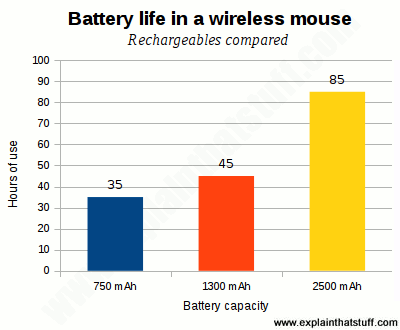
Chart: How long will your mouse batteries last? Rechargeables don't last as long as high-capacity, disposal alkalines, but work out cheaper in the long run. Duracell quotes battery life of 35–85 hours for its AAA rechargeables in a typical wireless mouse.
There's nothing particularly special about wireless mice. They figure out your hand movements in
exactly the same way, but send the data to your computer using a wireless connection
(typically Bluetooth) instead of a USB cable.
USB doesn't only carry data: it also provides the power for small plug-in devices like mice.
Without that power, wireless mice obviously need one or more batteries (which adds a hidden
running cost) and are therefore slightly heavier than wired ones (not that that matters much
when they're on your desk). Bluetooth connections can be battery hogs so you might find
yourself replacing your mouse batteries more often than you'd like; once every
couple of months seems typical, though if you're using rechargeables, that might
fall to once a week—and some mice boast battery life of 12–24 months.
If you use your computer constantly, what will you do if your mouse batteries suddenly run flat? If you use rechargeables, that's
going to happen more often and be more of an issue. Fortunately, some mice do have battery-level indicators or ways of
warning you when the batteries are about to give out. Even so, you might prefer the reliability, cheapness,
and environmentally friendliness of a wired mouse over a wireless one.
Sponsored links
What if you can't use a mouse?
Photo: Touchpads on laptops are effectively built-in mice, but you can also buy larger, external versions of these things if you struggle to use something so small and fiddly.
A mouse requires pretty good dexterity and people with mobility impairments (or painful conditions like arthritis) may struggle to use one. What are the alternatives? There are ergonomically shaped mice with built-in handrests, joysticks you can move with other parts of your body, head controls, touchballs (like upside down ball mice), larger versions of the touchpads you get on laptops, and a few other possibilities.
Although it's not obvious, many programs have built-in keyboard shortcuts that can replace a certain amount of mouse activity (CTRL + C to copy is one most of us know, but each program has its own little set that are worth investigating and learning if you find a keyboard easier to use than a mouse).
If you use voice dictation software, you'll probably find it has a hands-free, verbal equivalent of mouse control built in. On some of the Dragon Dictate programs, for example, you say "mouse grid" to make a grid of nine rectangles appear on your screen, then simply speak the number of the segment that corresponds to the bit of the screen you want. The grid then zooms in on that segment with a smaller nine-segment grid and you repeat the process until you hit the precise part of the screen you're interested in. So, no mouse... no problem!
Who invented the computer mouse?
For most of their history,
computers were the province of
scientists and mathematicians. You needed a math degree just to understand
the manual and you could only tell them what to do by feeding in a
stack of index cards punched with holes. All that started to change
when a brilliant US computer scientist named
Douglas Engelbart (1925–2013) invented the computer mouse.
Engelbart realized computers were far too useful just for boffins: he could see they
had the power to change people's lives. But he could also see that
they needed to be much easier to use. So, during the 1960s, he
pioneered most of the easy-to-use computer technologies that we now
take for granted, including on-screen word processing, hypertext (the
way of linking documents together used in web pages like these),
windows (so you can have more than one document or program in view at
a time), and video conferencing.
But he's still best known for inventing the mouse, or the "X-Y
Position Indicator" as it was originally known. That stuffy
name was dropped when someone spotted that the cable hanging out
looked just like a mouse's tail. From then on, Engelbart's invention
was known simply as the "mouse".
Photo: One of the diagrams from Doug Engelbart's original 1970 patent. In the top
picture, you can see what looks like a very conventional computer setup; in 1970, when many computers
were still programmed with punched cards, this kind of mouse-driven computer desktop was absolutely revolutionary.
In the lower picture, you can see how Engelbart's mouse worked. Two wheels positioned at right angles turned when
you moved the mouse with your hands. Each wheel turned a potentiometer to measure how much the mouse
as a whole had moved. Brilliantly simple... and simply brilliant!
Picture courtesy of US Patent and Trademark Office from X-Y Position Indicator for a Display System by Douglas Engelbart.
About the author
Chris Woodford is the author and editor of dozens of science and technology books for adults and children, including DK's worldwide bestselling Cool Stuff series and Atoms Under the Floorboards, which won the American Institute of Physics Science Writing award in 2016. You can hire him to write books, articles, scripts, corporate copy, and more via his website chriswoodford.com.
Sponsored links
Find out more
On this website
Computers (a list of all articles about computer technology)
For more about the history of computer mice, take a look at
Douglas C. Engelbart: A biography from Marc Weber posted shortly after Douglas Engelbart's death in 2013.
History in Pix: A history of Douglas Engelbart's invention, from his personal website.
MouseSite: An archive of Douglas Engelbart's late 1950s and 1960s research at Stanford Research Institute, including his original demonstrations of the computer mouse. [Archived via the Wayback Machine.]
Human Computer Interaction by Alan Dix et al. Pearson Education, 2008. Comprehensive introduction to the design of the man-machine interface.
Articles
History
Computer Visionary Who Invented the Mouse by John Markoff. The New York Times. July 3, 2013. An obituary for Doug Engelbart and an assessment of his life's work.
Doug Engelbart Obituary by Jack Schofield, The Guardian, July 4, 2013, is an alternative take.
Encounters with HCI Pioneers by Ben Shneiderman. Interviews with towering figures from the 20th century (including Doug Engelbart) who made computers intuitively easy to use.
The Evolution of the Computer Mouse by Rob Beschizza, Wired, March 19, 2007. This article explores how mice have developed, from the original wooden Engelbart model through to more modern versions made by Apple and Logitech.
Alternatives to the regular computer mouse by Charlie Danger. Better Living Through Technology Blog. June 20, 2015. If you find a conventional mouse hard to use, here are some accessible alternatives, suggested by a British occupational therapist.
[PDF] Keyboard and Mouse Alternatives: BBC My Web My Way. A 14-page guide for people who find keyboards and mice hard to use. [Archived via the Wayback Machine.]
Patents
Patents are a great source of really clear, detailed explanations of how things work. Here are a few influential designs from the archives of the US Patent and Trademark Office (via Google Patents):
↑ I'm taking my 1961 and 1964 dates from Douglas
Engelbart's own webpage Historic Firsts: Mouse. As I document here, Engelbart filed his patent for the mouse in June 1967 and it was finally granted in November 1970
Please do NOT copy our articles onto blogs and other websites
Articles from this website are registered at the US Copyright Office. Copying or otherwise using registered works without permission, removing this or other copyright notices, and/or infringing related rights could make you liable to severe civil or criminal penalties.