When broadbandInternet first came along, it seemed like nothing short of magic. Suddenly, we could stay online as long as we wanted without blocking the phone or running up monstrous call charges. Music and movie downloads that had once taken hours or minutes now took minutes or seconds. High-resolution movie
streaming became possible,
shifting our focus from the "cathode-ray tube"
(television, in other words) to YouTube,
and powering IPTV and the Netflix revolution. Broadband, in short, swept us from the dirt tracks to the freeway—and left the 21st-century information age
lying at our feet. But how exactly does it get so much more Internet power
from exactly the same piece of cable that powers your ordinary telephone line?
And what's the difference between landline broadband (on your desktop computer)
and the mobile broadband that powers your cellphone?
Let's take a closer look!
Photo: Online! The instrument panel of a broadband modem/router—a gadget that connects your (digital) computer to the Internet using your (partly analog) phone line
using a technology known as DSL, explained below.
Most of us go online in two distinctly different ways: with desktop computers (in our homes, offices,
and schools) using fixed Internet connections and with mobiles (generally, laptops, tables, and smartphones)
using wireless Internet. Desktop computers typically use what's called "fixed-line" broadband that works over
old-style landline telephones or cable, while mobiles "roam" between different wireless Internet connections,
either hooking up to nearby Wi-Fi hotspots (which are linked to the Internet, like desktop computers, using phone or cable) or falling back on (generally) slower cellphone networks when Wi-Fi isn't available. In other words, there
are really two different kinds of broadband—fixed and mobile—and we'll consider them
one at a time. First, though, let's see how we got where we are today.
How telephones power the Net
Before the Internet came along, the world of computing was a very
different place. There were far fewer computers
and they worked mostly in isolation or in small networks
known as LANs (local area networks). The Internet has increased the power of people's computers many times
by allowing all these machines to talk to one another and exchange
information via such things as e-mail and file sharing.
You might wonder where the Internet came from; it seemed to take off virtually
overnight. In fact, the vital piece of infrastructure on which the Net
is built was already in place and had been invented back in the
1860s. I'm referring, of course, to the telephone
system. When computer networks began to take off in the 1970s, it was perfectly natural to use the
telephone system to connect them together. But this created an
immediate problem: computers exchange information (data) in a
number-based form known as digital,
whereas the telephone system had always been designed to handle rapidly changing sound waves
or analog information. How could computers
and telephones be made to understand each other?
Sponsored links
How dial-up Internet works
The answer turned out to be surprisingly simple. If you go on
holiday to a foreign country where you can't speak the language, you
have two choices. One is to shout, wave your hands around, and point
excitedly. A much better option is to get yourself a translator, who
can convert your words smoothly and seamlessly back and forth into the
foreign language. This second approach is the one that computers use
when they want to exchange information over the old-fashioned telephone
network. But instead of using a translator, they use an electronic
"translating" device called a modem.
A modem (which is short for
modulator-demodulator) takes the digital information that your computer generates and turns it into
analog information (up and down, constantly varying sound waves) that
can travel along the telephone network to another computer somewhere
else. At that other location, there is another modem that converts the
incoming analog information back into digital data that the other
computer can understand. Two computers can have a lengthy conversation
over the phone, just like two people chatting away, providing there is a modem
at each end of the line to translate the digital information they
generate into analog signals that can travel back and forth along the
telephone line. (Incidentally, if you're uncertain about the difference
between analog and digital, we have a simple article about
analog versus digital technology.)
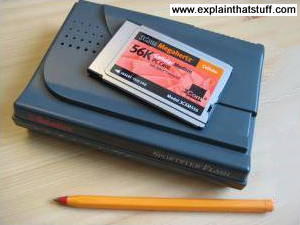
Photo: A pair of old-style dialup modems. The dark box on the bottom is a typical 56K dialup modem from the
1990s. On top is a 56K credit-card-sized PCMCIA modem for use in a laptop.
Before broadband took off in the early 2000s, people went online
with a system called dial-up Internet, which effectively
meant hooking up to your service provider through a very conventional telephone call.
When you dialed into the Internet in this way, what you were actually doing was
using a modem and telephone line to make a semi-permanent connection
into a much larger computer network. As your computer dialed in, it sent
digital information down the telephone line to a modem at your Internet
service provider (ISP). Once your modem was talking to the ISPs modem,
your computer could use the ISP's computer to access
other computers all over the Internet. Every time you browsed a web
site, your computer made a link to another computer somewhere else
on the planet using your ISP's computer as a stepping stone.
How is broadband different from dial-up?
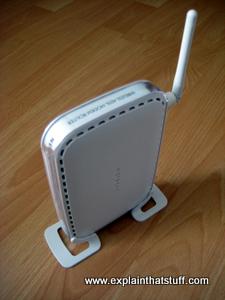
Photo: A typical broadband modem made by Netgear: the piece of equipment that lets your computer make a broadband connection to the Internet. The long white bar sticking out of the back is a wirelessantenna (aerial).
Dial-up is a really inefficient way of linking to the Internet and hardly
anyone uses it anymore. But it helps to know how it works if you really want to understand
broadband.
When you dial in, your computer telephones your ISP's computer and then hogs
the line for the duration of the call (in other words, for as long as
you're online). No-one can call you on the phone while you're online.
And even though your computer is hogging the entire line, your modem
and the ISPs modem exchange
information at very low speeds—at best, approximately 56Kbps (roughly
56,000 bits or binary ones and zeros) per second. If you're trying to
download MP3 music
tracks or digital photos, you'll
know this is grindingly slow and tedious. A single music track can take half an hour or more to
download. If you try using dial-up Internet these days, you'll find most web pages are
so bloated with images, ads, videos, and other widgets that they take minutes at a time to
load—if, that is, you can get them to load at all.
Broadband works a completely different way. Instead of treating your
phone line as a single, narrow pipe between your computer and the ISP's
computer, like a dialup connection, it divides the line into many
different channels. Information can travel in parallel streams down
these channels. It's like
dividing a highway into several lanes: lots more traffic can go down it in parallel than down a single-lane road. This is why broadband is so much faster than dialup. Even a slow broadband line, working at 512Kbps, is about nine times faster
than the best dialup connection, while even a so-so broadband line, working at around 8Mbps (megabits per second), can
be over 100 times quicker. A typical, modern fiber broadband line is about five times faster again,
so fiber is something like 500—1000 times faster than dialup!
Artwork: Dialup and broadband use the same phone line, but
broadband uses it much more efficiently. Where dialup sends only one voice or data
signal down one channel, broadband divides the line into multiple channels, each of
which can send data in parallel. Most channels (red) are used for downloading; a
few are reserved for uploading (blue). You can also have a phone conversation
at the same time (using the green channel).
Most people download far more information than they upload
(browsing web pages is almost exclusively downloading—because most of
the data is flowing into your computer from the Net), so broadband
allocates more channels to downloading than to uploading. This is why
broadband computers download several times faster than they upload. In
other words, downloading and uploading are not equivalent or
"symmetrical" processes: they are asymmetric. That's why the technical
name for this type of broadband is Asymmetric Digital Subscriber Line
or ADSL. ADSL is a variant of a more general type of broadband called DSL,
which allows uploading and downloading at (more or less) the same speed.
Why is broadband faster?
How does DSL cram so much data down a phone line? All its variants (DSL, ADSL, VDSL,
and so on) use something called discrete multi-tone modulation (DMT),
which is based on a mathematically efficient way of sending data down a line called
orthogonal frequency-division multiplexing (OFDM), also used in 4G and 5G cellphone
networks and Wi-Fi. Gulp, what does that all mean?
I describe cellphone OFDMA (closely related to OFDM) further down this page but, in essence, it's
just a very efficient way of dividing all the data being sent across multiple, overlapping frequency channels without losing any in the process. It's a bit like when you get the people sitting on a
park bench to move up so a few more can join them, except that all the people
on the bench have to sit on one another's knees and coats. OFDM means each
person still knows who they are and which coat they're wearing, even though someone
else may be squatting on their lap.
If most people are just downloading, why doesn't broadband Internet scrap the uploading channels altogether and make
browsing even faster? Any type of web browsing involves a certain amount of two-way traffic between your computer
(which is called a client) and the remote computers (servers) that host the pages you're looking at.
Even though most of the data is flowing into your computer, a certain amount still has to flow in the opposite direction each time your computer requests a new page. In other words, even when all you're apparently doing is downloading, there's some uploading going on in the background to make that happen. You can think of web browsing as a conversation, albeit one where most of the "talking" is done by the server.
That just leaves one more question: how can you talk on the phone
while your computer is simultaneously sending and receiving data?
Simple. Some of the channels on the line are reserved for phone calls.
People's voices use relatively low-frequency sounds, compared to the
higher-frequency signals that computer modems use, so it's relatively
easy to keep the phone signals separate from the computer data.
How fast is DSL?
Speeds have improved dramatically since most people encountered
broadband about two decades ago. According to the ITU-T, original ADSL was
defined as 8Mbps in 1999; ADSL-2 arrived in 2003 with a three-fold
speed increase to 24Mbps or 70Mbps for VDSL ("very high speed DSL").
In 2010, VDSL2 raised the bar to 100Mbps, raised again to 300Mbps with
the arrival of VDSL2-Vplus in 2015.
[1]
Another DSL variant, G.fast, promises up to 1GB/s (1000Mbps),
with typical speeds of 160–330 Mbps, but only over relatively short distances.
It's important to note that these speeds are theoretical—the maximum
possible in each case. In practice, unless you're using fiber broadband, the length of the line from your modem to the local telephone exchange will dramatically affect the speed you can
obtain, largely because of "cross-talk" between different lines in the phone cables,
the greater chance of interference from other electrical equipment on longer lines,
the number of other people online, and so on.
With ADSL and ADSL-2, for example, speeds might drop from perhaps 8Mbps or 20Mbps to
1Mbps or less at a distance of 3km (1.9 miles) or so from the exchange.
With VDSL and VDSL2, you can also expect a speed degradation (for both downloading
and uploading) of perhaps 80 percent at a distance of 2km (1.2 miles) or so.
[2]
If you're more than 1–2km from your local exchange and you find regular (non-fiber)
broadband is grindingly slow, you'll either need to switch to fiber or consider
mobile (cellphone-based) broadband instead.
Chart: Access to fast broadband varies dramatically.
For the world as a whole, over 90 percent of the population can now access reasonably fast broadband
(defined as 10Mbps or faster), but that falls to a mere 41 percent in Africa, where far
more people still use slow broadband lines. Source: Drawn using data from ITU-T Global Connectivity Report 2022, p.31.
Why isn't my new broadband any faster?
Switch from ordinary broadband (2–7Mbps) to fiber (~40Mbps) and you might reasonably
expect your web browsing to accelerate by about 5–20 times—but, sadly, it won't.
Although browsing will be noticeably quicker, you'll find websites still take ages to respond,
ads take a long time to load, and pages, on the whole, won't be that much faster than they
were before. That's because most of the "slowness" in displaying a web page doesn't come from
the time it takes for things to download from a remote web server to your personal web browser:
it comes from how long the server takes to respond and how long the browser takes
to build a page from the bits the server sends. Neither of those things
is improved by a better connection.
Artwork: Web pages take time to load, partly because servers (left) take
time to respond, data has to travel over the network (middle), and your web browser has to put
everything together when it finally receives it (right). A faster connection doesn't
speed things up as much as you might expect because the network may be causing only a small part
of the overall slowness.
Where a faster connection does make a difference is in downloading and uploading large files.
So if you do lots of streaming, that will be faster and
more reliable. Installing apps (which involve downloading big files to start with)
and software updates will be a lot quicker. So will backing up files in the cloud.
Fiber-optic broadband
Telephone lines were never designed to carry computer data. The history
of the Internet is, in part, a struggle to shake off obsolete telephone technology.
There's obviously a limit to how fast your broadband Internet connection can
be if it's still largely based on copper-wire technology
dating back to the 19th century. If you're lucky enough to live in
an urban area where telephone calls and TV programs flow along fiber-optic cables,
you'll probably find cable broadband is the
fastest form of Internet you can get—and many times faster than
landline broadband.
Photo: Fiber To The Cabinet (FTTC) means you get fiber cabling as far as your local curbside telephone cabinet. This is mine. The rest of the distance to your home is handled by more conventional cabling.
In many countries, telephone operators are now gradually rolling out what's called
fiber-optic broadband, which promises much faster connections
than traditional broadband but still essentially over the ordinary public telephone network:
"much faster" means download speeds of at least 40Mbps (megabits per second, typically 10–20 times
faster) and upload speeds of 1–10Mbps (2–20 times faster). But it's still a compromise.
For most people, what they'll actually be using is a system called
Fiber To The Cabinet (FTTC) (sometimes called Fiber to the Curb), which means there's a fiber-optic
connection all the way from the local exchange to a "cabinet" (switching box) somewhere in your
street or neighborhood (usually within 0.5km or so of your home)—but the connection from the cabinet to your home is still (you guessed it) that slow old copper cable! Only if you have a Fiber To The Building (FTTB)
or Fiber To The Home (FTTH) connection, with fiber-optic cable running all the way, will you truly experience the benefits of mega-fast Internet.
So will we all enjoy fast fiber-optic broadband access in future? Possibly not. Now that cellphone
networks can compete effectively with wired telephone networks, it's much more cost-effective to deliver
mobile broadband (see below) to people in remote areas than to refit the entire,
antiquated, public telephone network; that's why people in developing countries are enjoying
growing Internet access through cellphones rather than through ordinary landline telephones (which they
never had and probably never will have). As cellphone networks become ever more sophisticated and
computers and phones continue to converge, it's likely many people will abandon wired landlines
and wired broadband altogether in favor of increasingly sophisticated wireless Internet.
Who invented broadband Internet?
Search for that question online and you'll find a plethora of suggestions, ranging from Alexander Graham Bell
(developer of the telephone) and Claude Shannon (father of information theory) to Robert Metcalfe (the inventor of Ethernet)
and Tim Berners-Lee (pioneer of the World Wide Web).
In fact, as with other notable technologies such as cars and computers, it's almost impossible to credit broadband to a single inventor: I'd suggest it was a collective effort. If you trawl through records of inventions at the US Patent and Trademark Office, you'll find a whole series of patents covering simultaneous use of telephone lines for voice and data (the essence of broadband).
Among the earliest were patents filed by Teltone's John D. Foulkes and Stephen Brolin et al of Bell Labs.
DSL, the concept we'd recognize as broadband today—defined as "the transmission of high-speed digital signals between a telephone central office and the customer premises"—dates from 1986 and was formally patented in 1990 by
Richard D. Gitlin et al of AT&T
(currently Distinguished University Professor of Electrical Engineering, Emeritus at the University of South Florida).
Mobile broadband
Mobile broadband is a really simple idea and it comes in two different varieties: it's either delivered
over a cellphone network or via Wi-Fi from what is, essentially,
just a landline or cable broadband link to the Internet. As we've
already covered the latter up above, the rest of this article focuses
on how cellphone networks deliver mobile broadband. The technical nitty-gritty of how
that works gets quite complex; we'll give you a quick and simple overview for starters,
followed by a more detailed technical explanation at the end.
Photo: Smartphones offer broadband by default on a fast cellphone network—and that's
one kind of mobile broadband. But "mobile broadband" can also mean using a desktop or laptop computer over a cellphone network with a plug-in dongle.
Broadband over cellphone networks
Cellular phones were largely inspired by landlines (traditional
telephones wired to the wall) and worked
in a very similar way—until
recently. A landline effectively establishes a permanent connection—an
unbroken electrical circuit—between
your phone and the phone you're calling by switching through various telephone exchanges on the way:
this is called circuit switching. Once a
landline call is in progress, your line is blocked and you can't use it for anything else.
As we saw up above, if you have broadband enabled on your telephone line, the whole
thing works a different way. Your telephone line is effectively split into two
lines: a voice channel, that works as before, by circuit switching, and
a data channel that can constantly send and receive packets of digital
data to or from your computer by packet switching,
which is the very fast and efficient way in which data is sent across the Internet.
(See our article on the Internet if you
want to know more about the difference between circuit switching and packet switching.)
As long as cellphones were using circuit-switching technologies,
they could work only at relatively slow speeds. But over the last
couple of decades, most service providers have built networks that use
packet-switching technologies. These are referred to as
third-generation (3G) networks and they offer data speeds similar to
low-speed landline broadband (typically 350kbps–2MBps). Over time,
engineers have found ways of making packet-switching cellphone networks
increasingly efficient. So 3G evolved into HSDPA (High-Speed Downlink Packet Access),
HSPA, or 3.5G, which is up to five times faster than 3G.
Predictably enough, 4G networks are now commonplace, based on
technologies called Mobile WiMAX and LTE (Long-Term Evolution).
And 5G is now rolling out around the world.
How do you use mobile broadband
You can use mobile broadband in two ways. If you have a smartphone
(most reasonably new, touchscreen cellphones qualify as smartphones,
while older Nokia-style phones with small LCD displays are
often called "feature phones" to differentiate them from smartphones),
you can download music and videos to your phone at high (broadband) speeds.
Unlike with a traditional phone call, where
you pay for access by the minute, with mobile broadband you pay by the amount you
download. So your mobile phone provider might sell you a certain number
of megabytes or gigabytes for a fixed fee. For example, you might pay so much
each month and be able to download 10GB, 30GB... 100GB (or more) of data (but there's
no restriction on how long you can actually be online, as there used
to be with dialup Internet contracts).
The other way to use mobile broadband is as a way of
getting online with a laptop when you're on the move. You buy a
"dongle" (which is a very small, lightweight modem that plugs
into the USB socket of your laptop), buy some access time from a
service provider, plug your dongle into the laptop, and away you go.
The dongle has its own SIM card (for which you'll need some kind of
cellphone network account) and built-in software, so it automatically installs itself on your PC. Think of your dongle as a cross between a modem and a
cellphone—but, because it has no battery
or screen, it's a fraction of the weight of a cellphone and somewhat smaller.
The smallest dongles are slightly bigger than USB flash memory sticks
and about twice as heavy (the black ZTE dongle in the photo below weighs about 21g or 0.7 oz).
Anywhere you can get a good (3.5G or 4G) signal, your dongle will pick up high-speed
mobile broadband. Where there is no 3.5G or 4G network coverage, your broadband
will work at 3G speeds (less than about 300kbps). Depending on
which country you're in and where you live and work, you may find
mobile broadband has much better overall coverage than Wi-Fi—in other
words, you can go online in far more places—and it can work out far
cheaper too. But it will generally be a lot slower than Wi-Fi unless you
can consistently get a 4G signal.
Photo: Smartphones have built-in connections to the cellphone network and Wi-Fi,
so they can seamlessly switch between the two kinds of mobile broadband depending on where you are
and what kind of connectivity they can find. But what if you want to use a laptop when you're on the
move and far from Wi-Fi? You could use one of these things: effectively, an adapter that allows
a laptop to hook up to a cellphone network. Technically, it's an HSDPA broadband wireless
modem—but the phone companies call them
"dongles". The dongle simply plugs into your laptop's USB socket
and has its own SIM card and software built in, so it's truly plug-and-play.
How will mobile broadband develop in future?
Cellphone companies are very excited about mobile broadband—and for good reason:
mobile wireless broadband users are growing much faster than
fixed (landline) broadband users. Worldwide, more people are
now using mobile broadband than landline broadband.
Today, 4G (LTE/WiMAX) is the default level of service we expect to find in most developed countries;
according to the ITU (World Telecommunication Union), some 85 percent of the world's population could
access 4G by the end of 2020. At least 90 percent of the world's people have access to 3G (or better)
mobile-broadband, but there's still a significant digital divide. In the least-developed
countries, 17 percent of people in rural areas have no mobile access at all, while 19 percent
have only 2G access.
[3]
Over the next few years, talk will turn increasingly to 5G, which will offer another 10-fold increase in speed,
cheaper bandwidth, greater reliability, and lower latency (faster connections), making it possible for many more people (and things) to be online at the same time. I say "things," because one major goal of 5G is to allow more "inanimate objects" to be connected online. This will help to power the so-called Internet of Things,
connecting everything from smart-home central heating systems and instantly trackable parcels to the world's increasingly interlinked computer systems. Another goal of 5G is to achieve greater integration with wired, landline networks: at some point, the distinction between "wired" and "wireless" is likely to disappear altogether as they converge and merge into a single, hybrid telecommunications network—part wired, part wireless—that can accessed anyhow, anytime, anywhere by anyone or anything.
Chart: Over the last two decades, the world has seen a steady shift away from wired landline telephones toward cellphones and mobile broadband. In 2008, mobile broadband overtook conventional, landline broadband as the most popular form of Internet access—and it's been growing rapidly ever since, largely because cellphones are much more popular in developing countries than landlines. Much of the world now has at least some Internet access, but there remain key "digital divides" between
different countries, genders, and age groups. Chart shows the world penetration rates per 100 people
for 2007 (darker bars) and 2022 (lighter bars). Source: Drawn by explainthatstuff.com using data from ITU: World Telecommunication Union: Statistics, Geneva, 2023.
Mobile broadband—in more detail
If that's all you want to know about mobile broadband, you can safely stop reading now.
The rest of this article is for those of you who want a slightly more technical explanation of
HSDPA (3.5G), LTE (4G), and 5G networks. First, it helps if we understand a little bit about the mobile cellphone systems that
preceded it and how they've evolved from one another.
Analog landlines
Imagine you want to make lots of money by setting up a telephone
company in your area. Back in the 1950s, you would have had to run
separate telephone lines to the homes of all your customers. In effect,
you would have given each customer a separate electrical circuit that
they could use to connect to any other customer via some central
switching equipment, known as the exchange. Phone calls made this way
were entirely analog: the sound of people's voices was converted into
fluctuating electrical signals that traveled up and down their phone
lines.
Analog cellphones (1G)
By the 1970s, mobile telephone technology was moving on apace. You
could now give your customers cellphones
they could use while they were on
the move. Instead of giving each person a wired phone, what you gave
them was effectively a radio handset that could transmit or receive by
sending calls as radio waves of a certain frequency. Now if everyone
uses the same frequency band, you can hear other people's
calls—indeed, the calls get all jumbled up together. So, in practice, you divide the frequency band available into
little segments and let each person send and receive on a slightly
different frequency. This system is called frequency-division
multiple access (FDMA)
and it's how the early analog cellphones worked (cordless landline
telephones still work this way). FDMA simply means lots of people use
the cellphone system at once by sending their calls with radio waves
of slightly different frequency. FDMA was like a radio version of the
ordinary landline phone system and, crucially, it was still analog.
FDMA cellphones were sometimes called first-generation (1G) mobile
phones.
Digital cellphones (2G)
The trouble with FDMA is that frequencies are limited. As millions
of people sought the convenience of mobile phones ("phones to go"), the
frequency band was soon used up—and the engineers had to find a new
system. First, they swapped from analog to digital
technology: phone calls were
transmitted by sampling the sound of people's voices and turning each
little segment into a numeric code. As well as sharing phone calls
between different frequency bands, the engineers came up with the idea
of giving each phone user a short "time share" of the band.
Effectively, the mobile phone system splits up everyone's calls into
little digital chunks and sends each chunk at a slightly different time
down the same frequency channel. It's a bit like lots of people being
in a crowded room together and taking it in turns to talk so they don't
drown one another out. This system is called time-division
multiple access (TDMA)
and it's a big advance on FDMA. GSM cellphones, based on TDMA, were the
second generation (2G) of mobile phones.
High-speed digital cellphones (3G)
Even TDMA isn't perfect. With the number of phone users increasing
so fast, the frequency bands were still getting overcrowded. So the
engineers put their thinking caps on again and found yet another way to
squeeze more users into the system. The idea they came up with next was
called code-division multiple access
(CDMA) and uses elements of both TDMA and FDMA so a number of
different callers can use the same radio frequencies at the same time.
CDMA works by splitting calls up into pieces, giving each piece a code
that identifies where it's going from and to. It's effectively a
packet-switching technology similar to the way information travels
across the Internet and it can increase the overall capacity of the
phone system by 10–20 percent over TDMA. Basic CDMA evolved into an
even higher-capacity system called Wideband
CDMA (WCDMA), which sends data packets over a wide band of radio
frequencies so they travel with less interference, and more quickly and
efficiently (an approach known as spread-spectrum). WCDMA is an example
of a third generation (3G) cellphone system. The 3G equivalent of GSM
is known as UMTS.
"Broadband" cellphones (3.5G)
Ordinary CDMA is great for sending phone calls, which involve
two-way communication. But it's not so good for providing Internet
access. Although Net access is also two-way (because your computer is
constantly requesting Web pages from servers and getting things back in
return), it's not a symmetrical form of communication: you typically
download many times more information than you upload. Fast home
broadband connections achieve their high speeds by splitting your phone
line into separate voice and data channels and allocating more data
channels to downloading than to uploading. That's why broadband is
technically called ADSL: the A stands for asymmetric (and DSL means
digital subscriber line)—and the "asymmetry" is simply the fact that you do more
downloading than uploading.
Think of HSDPA as a kind of broadband, cellular ADSL. It's a
variation of CDMA that is designed for downloading—for sending lots of
data to broadband cellphones or laptops attached with mobile broadband
modems. It's optimized in various different ways. First, like ADSL, it
introduces a high-speed downloading channel called HS-DSCH
(High Speed Downlink Shared Channel),
which allows lots of users to download data efficiently at once. Three
other important features of HSDPA are AMC
(adaptive modulation and coding), fast base-station scheduling (BTS),
and fast retransmissions with
incremental redundancy. What does all that stuff actually mean?
AMC (Adaptive modulation and coding) simply means that the
cellphone system figures out how good your connection is and changes
the way it sends you data if you have a good connection. So if you're
in the middle of a cell (near a cellphone antenna base station), you'll
get more data more quickly than if you're at the edge of a cell where
reception is poor.
Fast base-station scheduling means that the base station figures
out when and how users should be sent data, so the ones with better
connections get packets more often.
In any packet-switching system, packets sometimes get lost in
transmission, just as letters get lost in the regular mail. When this
happens, the packets have to be retransmitted—and that can take time.
With ordinary CDMA technologies, retransmissions have to be authorized
by a top-level controller called the radio network control (RNC). But
with HSDPA, fast retransmissions are organized by a system closer to the end
user, so they happen more quickly and the overall system is speeded up.
Incremental redundancy means the system doesn't waste time
retransmitting bits of data that successfully got through first time.
Put all this together and you have a cellphone system that's
optimized for sending out packets of data to many users at once—and
especially those with good connections to the network. Because it's better than 3G, they call it 3.5G.
High-speed broadband cellphones (4G)
It took about 40 years for cellphones to get from basic analog, voice conversations up to
3.5G and 4G mobile broadband. Broadly, 4G is something like 10–50 times faster than 3G (depending which way the wind is blowing and whose figures you choose to believe).
What makes 4G better than 3.5G and 3G? Although there are numerous differences, one of the most significant
is that CDMA (the way of getting many signals to share frequencies by coding them) is replaced by a more efficient technology called orthogonal frequency-division multiple access (OFDMA), which makes even better use of the frequency spectrum. Effectively, we can think of OFDMA as an evolution of the three older technologies, TDMA, FDMA, and CDMA. With traditional FDMA, the available frequency spectrum is divided up into parallel channels that can carry separate calls, but there still has to be some separation between them to stop them overlapping and interfering, and that means the overall band is used inefficiently. With OFDMA, signals are digitally coded, chopped into bits, and sent on separate subchannels at different frequencies. The coding is done in such a way that different signals are orthogonal (math-speak meaning they are made "independent" and "unrelated" to one another), so they can be overlapped much more without causing interference, giving better use of the spectrum (a considerable saving of bandwidth) and higher data speeds. OFDMA is an example of multiplexing, where multiple, different frequency bands are used to send data instead of one single frequency band. The big advantage of this is that there's less signal disruption from interference (where selected frequencies might be destroyed by transmissions from other sources) and fading (where signals gradually lose strength as they travel); lost data can be reassembled by various error-correction techniques. At least, I think that's how it works—I'm still figuring it out myself!
The next generation (5G and beyond)
Cynics would say that cellphone manufacturers need us to update to a new model each year, while the cellphone networks want us to send more and more data; both are helped by the shift to newer, better, and faster mobile networks. But, overwhelmingly, the main driver for 5G is that so many more people—and things—want to connect wirelessly to the Internet.
As we've already seen, 5G is meant to be faster, more reliable, higher capacity, and lower latency than 3G and 4G, which already use their very congested part of the frequency spectrum very efficiently. So how do you possibly get even more out of a limited band of radio waves? One solution is to switch to a completely different, less-used frequency band. Where existing 4G cellphone networks use radio waves that have frequencies of roughly 2GHz and wavelengths of about 15cm (6in), 5G could switch to much higher frequencies (between 30–300GHz) and shorter wavelengths (a millimeter or less). These so-called "millimeter-waves" are currently used by things like radar and military communication, so there's much less congestion than in the current frequency band. But the drawback is that these waves don't travel so far or so well through objects like walls, so we might need more mobile antennas, mobile antennas inside our buildings, more cells in our cellphone networks, completely different antennas in our smartphones, and a range of other improvements. The switch to higher frequencies is one aspect of 5G; the other aspect would be the development of improved technologies building on existing approaches such as HSDPA and LTE.
Of course, it doesn't stop here. Cellphone engineers are already talking about 6G...
Summary
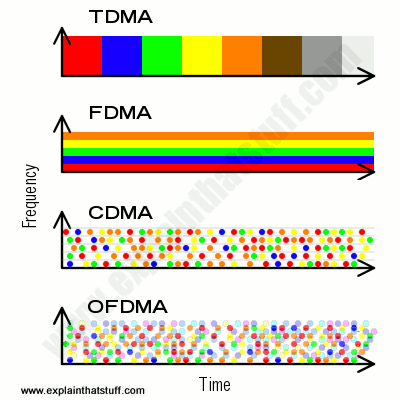
Here's a hugely simplified attempt to represent, visually and conceptually, the four key wireless technologies. I emphasize that it is a considerable simplification; if you want a proper, technical account, you'll find a selection of books and papers in the references at the end.
TDMA: In the simplest case we can imagine, each call gets a time-share of the complete frequency band. It's a bit like callers waiting in line for a payphone. Each one waits until the phone is vacated by the previous caller, makes their call, and hands on to the next person.
FDMA: With the total frequency band split up into smaller bands, we can imagine sending multiple calls in parallel. This is a bit like having four payphones in a line; four callers can use them simultaneously. We could also run TDMA at the same time, dividing each of the smaller bands into time slots.
CDMA: We break each call into pieces, code them, and send them down any available channel. This makes much better use of our available frequency spectrum, because none of the channels is idle at any time. However, channels have to be kept separate to stop them from interfering, which means our total frequency band is used inefficiently.
OFDMA: We set up our system so that we can, effectively, superimpose channels on top of one another, packing in even more capacity to give even greater data speeds.
It's worth remembering that "4G" and "5G" are being used—like 3G and 3.5G before them—as
marketing terms. Some systems you see
advertised as "4G" are really just glorified 3G or 3.5G systems that don't meet the technical (international standard) definition of 4G, which is formally known as International Mobile Telecommunications-Advanced (IMT-Advanced). Now you might or might not care about international standards, but it's always worth questioning whether the sales people are delivering what they claim as they part you from your cash.
Sponsored links
Find out more
On this site
Internet: How does computer data travel over the Net?
World Wide Web: What's all this HTTP and HTML stuff and how does it work?
Lighting a Fire Under Satellite Broadband by Kim Krieger. IEEE Spectrum. February 17, 2012. Surprisingly, fast ground networks are the key to fast satellite broadband.
Mobile broadband (4G and 5G)
What you need to know about 5G by Brian X. Chen. The New York Times, September 24, 2021. A clear, hype-free introduction to the 5G rollout?
What 5G Will Mean for You by Mark Scott. The New York Times, February 21, 2016. A short summary of the likely benefits we'll enjoy once 5G becomes commonplace.
Wired Explains: Everything You Need to Know About 4G Wireless by Priya Ganapati. June 4, 2010. A good, simple backgrounder on 4G written as a FAQ. Short on technical detail, but it does explain the key differences between 3G, 3.5G, and 4G and includes a comparison of LTE and WiMAX.
Books
General broadband
These books are now quite old, but they're still decent introductions to the basic technology.
Data Communications Principles by Richard D. Gitlin, Jeremiah Hayes, and Stephen B. Weinstein. Springer, 1992. A dated but still valuable introduction to the basic concepts from the co-inventor of DSL.
Mobile broadband
I've yet to discover a good, simple book explaining cellphone network technologies for general readers; please be aware that these books are very detailed technical explanations aimed at advanced-level students or industry professionals, often containing quite complex math.
4G, LTE-Advanced Pro and The Road to 5G by Erik Dahlman et al. Academic Press, 2016. A detailed (600+ page), technical explanation of the latest technologies and trends in mobile, cellphone Internet access.
Mobile Broadband (Including WiMAX and LTE) by Mustafa Ergen. Springer, 2009. An introduction to the next generation of mobile broadband, based on OFDMA technology (not discussed in this article).
US Patent 3,488,445: Orthogonal frequency multiplex data transmission system by Robert W. Chang, Bell Labs. January 6, 1970. I believe this is the earliest patent covering modern OFDM, though (according to Ramjee Prasad's book, section 1.2.1 "History of OFDM", p11) development of the technology can be traced back to the 1950s and 1960s.
US Patent 2,292,387: Secret communication system by Hedy Kiesler Markey (Hedy Lemarr) and George Antheil. August 11, 1942. Hedy Lemarr and George Antheil's groundbreaking spread-spectrum patent (originally proposed for torpedo control).
World Telecommunication/ICT Development Report 2010: Monitoring the WSIS Targets: This older report focuses on the challenges of getting developing countries connected to the Internet, especially in remote areas. It's worth a look if you're interested in seeing how much progress has been made over the last decade or so.
Please do NOT copy our articles onto blogs and other websites
Articles from this website are registered at the US Copyright Office. Copying or otherwise using registered works without permission, removing this or other copyright notices, and/or infringing related rights could make you liable to severe civil or criminal penalties.