Want to go online? Chances are you'll
be needing a modem—a device that lets your computer send signals back and forth
along a telephone line. You need a
different kind of modem to go online with a dialup connection, with
broadband, or with (mobile broadband). What exactly are
modems and how do they work? Let's take a closer look!
Photo: A modern broadband modem/router, which connects your computer to the Internet over a phone line.
Telephones are amazing: they can carry the sound of your voice from
one side of the world to the other in a matter of seconds by making electricity
flow down a wire. Telephones are also the power behind the Internet—without them, it would be almost
impossible for most of us to go online.
The marriage of the telephone (a 19th-century technology) with
the computer (a 20th-century innovation) was something of a shotgun
wedding. Computer technology is largely digital:
it involves
storing, processing, and transmitting information in the form of
numbers. But telephone technology is still partly analog:
information is transmitted down phone lines as continuously varying
electrical signals. How, then, do digital computers communicate across
analog telephone lines designed to carry speech? Simple: they use
modems, devices that turn digital information into analog sound signals
for
the telephone journey and then turn it back again at the other end.
Think of modems as translators. Computers speak digital, and telephones
speak analog, so you need modems to translate between the two.
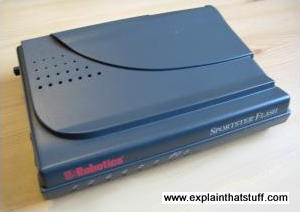
Photo: A typical US Robotics (3Com) dialup
modem from the late 1990s. This one communicates via V.90 at 56k bits
(binary digits) per second (kbps). I'll explain what that means in
a moment. The little red LEDs
along the front flicker on and off to tell you what the modem's doing.
What does a modem do?
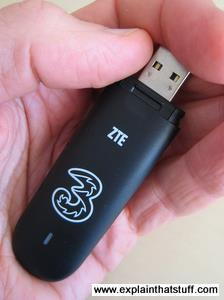
Photo: A state-of-the-art HSDPA
broadband wireless
modem (sometimes called a "dongle") made by ZTE. You
need one of these to surf the Net on a cellphone network.
Suppose you want to connect your computer to an Internet Service Provider (ISP) using an
ordinary phone
line. The computer at your end needs a modem to modulate
its
digital signals (add them on top of an analog telephone signal) so they
can
travel down
the phone line just like the sound of your voice. Once the signals have
reached the other end, they have
to pass through a second modem, which demodulates
them (separates them out from the telephone signal and turns them back
into digital form) so the ISP computer can understand them. When the
ISP computer replies, it sends its signals
through a modulator back down the line to you. Then a demodulator at
your end turns the signals back into digital form that your computer
can understand.
A box that we call a modem thus contains two different
kinds of translators. There's a modulator
(for transmitting digital
signals out down the phone line in analog form) and a demodulator
(for receiving analog signals from the phone line and turning them back
into digital form)—and that's why it's called a modem.
Modulation is simply a fancy name for transmitting information by
changing the shape of a waveform. If you
send information by
making the peaks of a wave bigger or smaller, that's called amplitude
modulation or AM (because the amplitude is the size of the wave
peaks); if you send information by changing how often the peaks travel,
that's frequency modulation or FM (because
the frequency is the
number of peaks that travel per second). You may have heard the terms
AM and FM before, because they describe how radio signals travel. (You
can read a slightly longer explanation of modulation in our article on radio.)
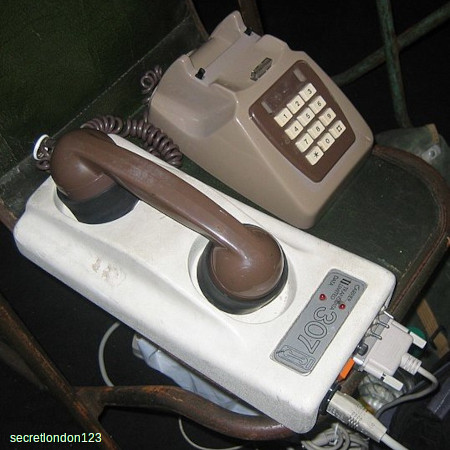
Photo: Modems as they used to look. This contraption is called an acoustic coupler and its
built-in modem allows you to connect your computer to a network using an ordinary landline telephone. Devices like this were popular when people had phones that were hard-wired into connection boxes and couldn't be unplugged or switched for modern-style RJ11 phone jacks. In some countries, it was illegal to connect directly to the phone network, so couplers like this acted as handy intermediaries. Unfortunately, you have to dial manually with equipment like this—and in the early days, usually with a rotary dial phone, so making a connection could be a very slow business, especially if you dialled a wrong number. Photo by courtesy of secretlondon123
published on Wikimedia Commons under a Creative Commons (BY-SA) licence.
Sponsored links
Controlling modems
Think of how you use the telephone. You don't just pick up the
receiver and start talking. You have to go through a series of
quite orderly steps: you have to lift the receiver, wait for the
dialing tone, dial each number so it's recognized, wait for the sound
of the ringing at the other end, listen for the other person's voice,
say hello, and then alternate your speech with theirs. If there's no
answer, you have to know when to replace the receiver and hang up the
call.
Handshaking
Modems have to behave exactly the same way, exchanging information
in a very orderly conversation. If you've used a dialup modem, you'll have
noticed that your modem opens the line, dials the number, waits for the
other modem to reply, and "handshakes", before any real data can be
sent or received. If there's no reply, it'll hang up the line and tell
you there's a problem. Handshaking is the
initial, formal part of the conversation
where two modems agree the speed at which they will talk to one
another.
Standards and speeds
If you have a very fast modem but your ISP has only a slow
one, the two devices will be forced to communicate at the slower speed.
Every dialup modem works according to a particular international
standard (a number prefaced by a capital letter V)—and this tells you how
quickly it sends and receives data in bits (binary digits) per second (usually abbreviated bps).
The most common standards are:
Standard
Speed (bps)
V.22
1200
V.32
9600
V.32bis
14,400
V.33
14,400
V.34
28,800
V.34+
33,600
V.90
56,000
V.92
56,000
The older standards,
such as V.22, assumed the connection between two computers was mostly
analog; newer standards like V.90 achieve higher speeds by assuming the
connection is at least partly digital.
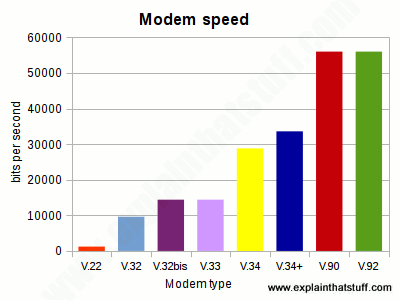
Chart: Here's the same information from the table shown graphically. You can see that the most recent standards (like V.90) are about 4–5 times faster than the earlier ones.
Command sets
If you use the Windows operating system, you don't normally need to worry
about how your modem communicates: it's all done automatically for you.
But you can get your modem to send extra control commands, if you're
having problems with it making calls. Using what's known as the
AT command language (or the Hayes command set, for the
company that invented it in 1977), you can change all kinds of other settings, including the
maximum and minimum communication speed, how long the modem will wait
before hanging up if the call is not answered, and so on. The exact
commands you can use vary from manufacturer to manufacturer and from
modem to modem, but a few are usually the same on every modem. For
example, sending a command AT m0 almost always switches off the modem's
loudspeaker so you don't get that irritating, electronic, handshaking
chit-chat blasting out at you at the start of every session, while
AT m1 keeps the speaker on until the connection is made (so you can check the
handshaking sounds okay) and then disconnects
it so you can enjoy some peace and quiet once you're online.
Different kinds of modem
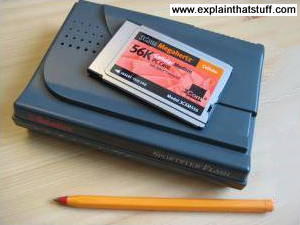
Photo: A pair of dialup modems. On the bottom, our
typical 56K dialup modem. On top, there's a 56K credit-card-sized
PCMCIA modem for use in a laptop. The laptop card modem has no
loudspeaker, LED indicator lights, or other advanced features but, in
other respects, works the same way. It takes its power from the
laptop's PCMCIA connection and needs no external power supply.
Hardware modems
External modems—ones you connect to your computer through a cable or PCMCIA socket—are examples
of what we call hardware modems: the modem functions are carried out entirely by chips and other electronic components in hardware.
Dialup modems are probably the most familiar hardware modems, though few us use
them these days. A dialup connection to an ISP uses circuit
switching, just like an
ordinary phone call. But if you're using broadband to get a faster
connection, you'll use your phone line in an entirely different way,
using a data-handling technique called packet
switching—and you'll need
an entirely different kind of modem. (Read more about circuit and
packet switching in our article about the Internet.)
If you want to use broadband
(packet switching) on a cellphone network, you'll need yet another kind
of modem (known as an HSDPA modem).
If you link to the Internet without using a telephone line, either
by using a wired ethernet connection or Wi-Fi
(wireless ethernet), you won't need a modem at all: your computer sends
and receives all its data to and from the network in digital form, so
there's no need to switch back and forth between analog and digital
with a modem.
Dialup modems have another handy feature: they can communicate with
fax machines at high speed. That's why they're sometimes called
fax modems. If you have fax software on your
computer, you can use your modem to fax out word-processed documents
and receive incoming faxes.
Cable modems are designed to provide broadband Internet over cable TV connections rather than
(as with other modems) the telephone network. Before fiber-optic broadband
came along, cable was generally the fastest way of getting online. You need a cable modem in your home or office
and there's a piece of kit at your service provider's premises that manages all the outgoing and incoming connections (a cable modem termination service or CMTS). The two are connected by coaxial cable or a combination of coaxial and fiber-optic cabling known as HFC (hybrid fiber coaxial). Cable modems are faster (provide higher bandwidth) than traditional (ADSL) broadband telephone modems and their speed doesn't degrade as you get further from the phone exchange (as traditional broadband connections do). However, many customers share the same bandwidth (so you can be affected by how many other local users are online) and they're less secure (since users don't have the same dedicated connection all the way to the premises), more susceptible to power outages (the telephone network is inherently more reliable), and tie you to a single provider (your cable company).
Software modems
As their name suggests, software modems carry out virtually all of a modem's jobs using
software. That makes them low-cost, compact, and easy to upgrade,
so they're a particularly popular choice in things like laptop and netbook computers where space is at a premium.
Software modems rely on the host computer's processor to carry out some of their functions, which
means they slow a computer down more than an external hardware modem with its own built-in processor and
dedicated chips. At its most extreme, a software modem is just a DAA (data access arrangement): the
most basic part of a modem that makes the physical interface between the relatively high voltage analog phone line and public phone network (on one side) and the lower voltage, digital modem circuits (on the other), ensuring the two can safely talk to one another.
What are the parts inside a modem?
In theory
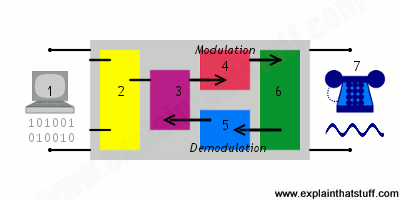
A modem is the "interpreter" between a digital computer and the traditionally analog phone network, which is sometimes
(especially in technical books) referred to as the PSTN (public switched telephone network).
The main components shown here are:
Computer or computer network—entirely digital.
Computer interface.
Modem controller—essentially the modem's independent, central processor.
Digital to analog converter (for outgoing, transmitted data)—turns computer data into phone-like analog signals.
Analog to digital converter (for incoming, received data)—turns phone signals into digital computer data.
Data access arrangement (DAA) makes modem's circuits compatible with the electrical requirements of the phone network.
PSTN—the "analog" phone network (these days, it's also substantially digital!).
In practice
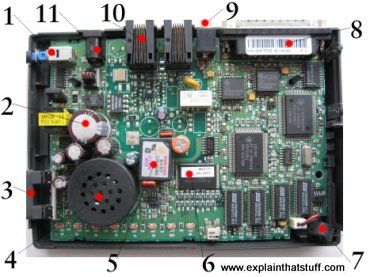
Lift the lid on a dialup modem and this is what you'll find inside:
On/off button: Spring-loaded switch turns the power on and
off.
Capacitors: Have a variety of jobs to
do in a modem, including smooth out current peaks. (See our article on capacitors for more on how they work.)
Volume control: Controls the
loudspeaker volume.
Loudspeaker: Relays what's happening on
the phone line as your modem dials. Read more about loudspeakers.
Modem chip: Modulates (add digital
information to the outgoing telephone signal) and demodulates (separate the
digital information from the incoming signal).
Other chips: Control modem chip and other components.
Microphone: Allows you to send your own
voice down the phone line. Discover how microphones work.
Serial connection: Connects the modem
to your computer's serial (RS-232) port. Newer modems connect to the USB port instead.
Microphone socket: Connects an external
microphone so you can record messages in higher quality than if you use
the built-in microphone.
Telephone sockets: Connect your modem
to a phone socket with a standard (RJ11) telephone cable. There's a
second socket where you can plug a
telephone handset into your modem. This lets you to use your phone
through the modem
when your computer's not already using the line.
Power input: Connects the modem to an
external power supply unit (electricity transformer)
to your modem.
Fax, Modem, and Text for IP Telephony by David Hanes and Gonzalo Salgueiro. Cisco Press, 2008. A comprehensive guide to sending non-voice data over telephone lines. Chapter 1 is a great introduction to how modems work, including a brief history, a look at the components of a modem, and an analysis of exactly what happens during a modem call.
Next-Generation Modems by Gilbert Held. Wiley, 2000. A detailed technical guide to DSL and cable modems.
The Theory and Practice of Modem Design by John A. C. Bingham. Wiley, 1988. A practical reference for modem designers. Somewhat dated, but still of interest.
If Your Wi-Fi Is Terrible, Check Your Router by Brian X. Chen. The New York Times, October 7, 2015. Upgrading to a recent router that supports newer Wi-Fi protocols can make all the difference.
The Cable Modem Traffic Jam by Walter S. Ciciora. IEEE Spectrum, June 1, 2001. A useful explanation of how cable modems work and some of the technical problems they faced, years ago, as an emerging technology.
Fast-lane modems by Jim Schefter. Popular Science, November 1985. In this blast from the past (over a quarter century ago and before the Web was even invented), Popular Science heralded the arrival of "fast-lane" modems that work at 21,000 bits per second! Worth reading for an insight into how slow and primitive personal computing used to be.
Patents
For richer technical details, patents are always worth a look. Here are a few examples:
US Patent 5,008,901: Asymmetrical duplex error-controlled modem by Clifford H. Wallach, US Robotics, Inc., April 16, 1991. Describes how a typical dialup modem achieves higher overall performance by splitting the line into a high-speed, wideband channel for transmitting data in one direction and a lower speed, narrower band channel for data going back the other way. This kind of "asymmetrical" communication is also the essence of ADSL broadband.
Also well worth a look are patents by Dave Forney ("George David Forney Jr") for Codex and Motorola from the late 1960s onward covering various aspects of early modem design.
Please do NOT copy our articles onto blogs and other websites
Articles from this website are registered at the US Copyright Office. Copying or otherwise using registered works without permission, removing this or other copyright notices, and/or infringing related rights could make you liable to severe civil or criminal penalties.