Twenty or thirty years ago, there was
something you could take for
granted: you could walk into a public library, open up a reference
book, and find information on almost any subject you wanted. What we
take for granted nowadays is that we can sit down at practically any
computer, almost anywhere on the planet, and access an online
information library far more powerful than any public library on Earth:
the World Wide Web. Twenty-first century
life is so dependent
on the Web that it seems remarkable we ever lived without it. Yet the
Web was invented less than 30 years ago and has been a huge popular
success for only about 20 of them. One of the greatest inventions
of all time... is also one of the newest!
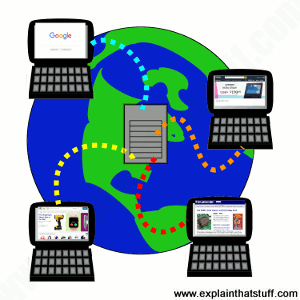
Artwork: Our gateway to the world: the World Wide Web (WWW) is made from information that travels across the Internet. When you look at a website, a program running on your computer (a web browser such as Google Chrome or Mozilla Firefox) pulls the information you need off a powerful, centralized computer (a web server). Each server may be firing pages out to hundreds, thousands, or millions of browsers at more or less the same time. A single web page might be downloaded from just one server or it could be built from separate parts downloaded from dozens of different servers all over the world.
What's the difference between the Web and the Internet?
Let's get one thing straight before we go any further: the Web and
the Internet are two totally different
things:
The Internet is a
worldwide network of computers,
linked mostly by telephone lines; the
Web is just one of many things (called applications)
that can run on the Internet. When you send an email, you're using the Internet:
the Net sends the words you write over telephone lines to your friends.
When you chat to someone online, you're most likely using the Internet
too—because it's the Net that swaps your messages back and forth.
But when you update a blog or Google for information to help you
write a report, you're using the Web over the Net.
You can read more in our article about how the Internet works.
The Web is the worldwide
collection of text pages, digital
photographs, music files,
videos, and
animations you can access over the Internet. What makes the Web so
special (and, indeed, gives it its name) is the way all this
information is connected together. The basic building blocks of the Web
are pages of text, like this one—Web pages as
we call them. A
collection of Web pages on the same computer is called a website.
Every web page (including this one) has highlighted phrases called links
(or hypertext links) all over it. Clicking
one of these takes
you to another page on this website or another website entirely. So
far, so simple.
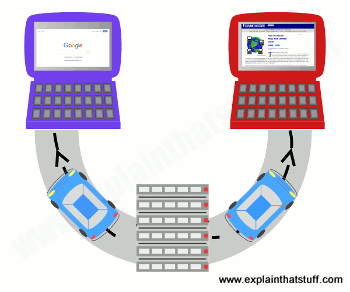
Illustration: The Internet is like a superhighway (gray) connecting the world's computers together. The World Wide Web is a kind of traffic that can travel on that highway. In this example, two web pages (cars) are traveling from the server (the computer where they're stored) at the bottom to web browsers running on the laptops at the top. Other kinds of traffic that can travel on the Internet include email, VoIP phone calls, torrents, and files shared peer-to-peer.
Sponsored links
How computers can talk the same language
The really clever thing about the Internet is that it allows practically
every computer on the planet to exchange information. That's a much
bigger deal than it sounds. Back in the
earlier days of computers,
in the 1960s, 1970s, and 1980s, it was
rare for computers to be able to exchange information at all. The
machines made by one manufacturer were often totally incompatible with
those made by everyone else. In the 1970s, early personal computers
(which were called microcomputers) could not even run the same
programs. Instead, each type of computer had to have programs written
specially for it. Hooking computers up together was possible, but
tricky.
So most computers were used as standalone machines, like gigantic
pocket calculators. Things like email and chat were all but impossible, except
for a handful of scientists who knew what they were doing.
Photo: Microcomputers like this Apple ][ sold in the hundreds of thousands in the late 1970s
and early 1980s, but machines made by one company couldn't share information with those made by other manufacturers.
Apple ][ photo by
Rama
published on
Wikimedia Commons
under a
Creative Commons (CC BY-SA 2.0 FR) licence.
All this began to change in the 1980s. The first thing that happened
was that IBM—the world's biggest computer company, famous for its "big
blue" mainframes—introduced a personal computer for small businesses.
Other people started to "clone" (copy) it and, pretty soon, all personal
computers started to look and work the same way. Microsoft came up with a
piece of software called Windows that allowed all these
"IBM-compatible" computers to run the same programs. But there was a
still a problem getting machines like home computers talking to giant
machines in science laboratories or big mainframes in large companies.
How could computers be made to talk the same language?
The person who solved that problem was English computer scientist
Tim Berners-Lee (1955–). In the 1980s, he was working at CERN, the
European particle physics laboratory, which is staffed mostly by people from universities around the
world who come and go all the time, and where people were using all kinds of
different, incompatible computers.
Berners-Lee realized CERN had no "memory": every time
people left, they took useful information with them. A related problem
was that people who used different computers had no easy way of
exchanging their research.
Berners-Lee started to wonder how he could get all of CERN's
computers—and people—talking together.
What's the difference between HTTP and HTML?
Although early computers were pretty incompatible, almost all of
them
could store or process information using ASCII
(American Standard Code for Information Interchange), sometimes known
as "plain text." In ASCII, the numbers 0–255 are used to represent
letters, numbers, and keyboard characters like A, B, C, 1, 2, 3,
%, &, and @. Berners-Lee used ASCII to come up with two basic
systems of rules (known in computer terminology as protocols).
If all the computers at CERN followed those two rules, he realized they
could
exchange any information very simply.
He called the first rule HTTP (HyperText
Transfer Protocol).
It is essentially a way for two computers to exchange information
through a simple "conversation," whether they're sitting next to one
another in the same room or on opposite sides of the world.
One computer (which is called a client and
runs a program called a web
browser) asks the other computer (which is called a server
or web server) for the information it needs
with a series of
simple messages. The web browser and the web server then chat away for
a few seconds, with the browser sending requests for the things it
wants and the server sending them if it can find them.
The HTTP conversation between a web browser and and a web server is a
bit like being at a dinner table when someone says: "Pass the salt,
please", someone else says "Here it is", and the first person says
"Thank you."
HTTP is a sort of simple, polite language that all computers have
learned to speak so they can
swap files back and forth over the Internet.
A computer also needs to be able to understand any files it receives
that have been sent by HTTP.
So Berners-Lee introduced another stroke of genius.
His second rule was to make all the CERN computers exchange files
written in a common language called HTML
(HyperText Markup
Language). It was based on ASCII, so any computer could understand it.
Unlike ASCII, HTML has special codes called tags
to
structure the text. A Web browser can read these tags and use them to
display things like bold font, italics, headings, tables, or images.
Incidentally, for the curious among you: you can see what the "secret"
HTML behind any web page looks like by right clicking your mouse on a
web page and then selecting the View source
or View page source option.
Try it now!
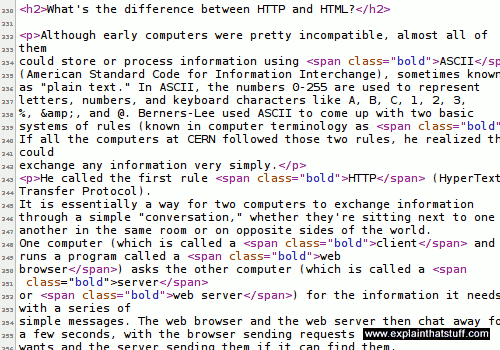
Artwork: An example of HTML code. This is the HTML that produces this web page. The little codes you can see inserted between angled brackets (< and >) are bits of HTML, which identify parts of the text as headings, paragraphs, graphics and so on. For example, new paragraphs are marked out with <p> and medium-sized headings with <h2> (header level 2).
HTTP and HTML are "how the Web works": HTTP is the simple way in
which one computer asks another one for Web pages; HTML is the way
those pages are written so any computer can understand them and display
them correctly. If you find that confusing, try thinking about
libraries. HTTP is like the way we arrange and access books in
libraries according to more or less
the same set of rules: the fact that they have books arranged on
shelves, librarians
you can ask for help, catalogs where you can look up book titles, and
so on. Since all libraries work roughly the same way, if you've been to
one library, you
know roughly what all the others are like and how to use them.
HTML is like the way a book is made: with a contents at the front, an
index at the back, text on
pages running left to right, and so on. HTML is how we structure
information so anyone can read it. Once you've seen one book, you know
how they all work.
What is JavaScript?
Web pages built in HTML are essentially "static" (unchanging) things. When you load them in a web browser, they
look exactly the same as they did when the web designer loaded them in his or her own browser.
Often, though, we want web pages to be more dynamic and responsive than this; we want them to respond to things that users
do and change, rebuild, or refresh themselves accordingly.
One way that web designers do this is by inserting little bits of computer code into web pages
called scripts, usually written in a fairly simple programming language called JavaScript.
This runs inside a web browser once a web page (and the JavaScript code it contains) has fully loaded,
so the technique is called client-side programming (because a browser is also known as a client.)
Just about the simplest thing you can do with JavaScript is display the date and time at the top of a web page. If you're writing an ordinary HTML web page, you obviously can't encode the current date and time because it will be wrong when someone else loads the page. But you can use JavaScript to do it instead, by reading the date and time from the computer's clock and displaying it in a familiar form. You can do very much more complex things with JavaScript, right up to running complete applications (what are called single-page applications or SPAs) inside a browser.
When Browser met Server
Web browsers (clients) and servers converse not in English, French, or German—but HTTP: the
language of "send me a Web page", "Okay, here it is." This is a brief example of how your browser
could ask to see our A-Z index page and what our server would say in response. The actual
page and its information is sent separately.
What does it all mean? Briefly, the browser is explaining what software it is (Firefox), what operating system I'm running
(Linux Ubuntu), which character-sets (foreign fonts and so on) it can accept, which forms of compressed file it can understand
(gzip, deflate), and which file it wants (azindex.html). The server (running software called Apache) is sending a compressed file (gzip), along with data about how long it is (19702 bytes) and what format it's in (text/html, using the UTF-8 character set).
Http status codes
Right at the start of the server's reply, you can see it says HTTP/1.1 200 OK: the 200 "status code" (sometimes called a response code) means the server has correctly located the page and is sending it to the browser. A server can send a variety of other numeric codes too: if it can't find the page, it sends a 404 "Not Found" code; if the page has moved elsewhere, the server sends a 301 "Permanently moved" code and the address of the page's new location; and if the server is down for maintenance, it can send a 503 "Service Unavailable" code, which tells browsers they should try again later (sometimes after a specified time).
What is a URL?
There was one more clever thing Berners-Lee thought of—and that was a
way for any computer to locate information stored on any other
computer.
He suggested each web page should have something like a zip code, which
he called
a URL (a Universal or Uniform Resource
Locator).
The URL is the page address you see in the long bar at the top of your
Web browser.
The address or URL of this page is:
https:// www.explainthatstuff.com/ howthewebworks.html
What does all that gobbledygook mean? Let's take it one chunk at a time:
The http:// bit means your computer can pull this page off my computer using the standard process called HTTP. If the URL begins with https, as it does for this page, communication is encrypted as it travels between your browser and the Web server (so things like credit-card numbers, user names, passwords, and so
on are kept secure from interference in transit). https pages are inherently more secure than http pages,
but https alone does not make a website completely secure: it simply secures the connection
between your computer and the server (or servers) you're talking to.
www.explainthatstuff.com is the address or domain name of my computer. Some websites use domain names that begin with things other than www (for example
maps.google.com and mail.yahoo.com),
which are called subdomains. maps.google.com, drive.google.com,
and indeed www.google.com are all subdomains of the main google.com domain.
howthewebworks.html is the name of the file you're currently reading off my computer.
The .html part of the filename tells your computer it's an HTML file.
Other filenames you might see include .php and
.asp, which mean the pages you're looking at are
"dynamic"; unlike "static" HTML pages, dynamic pages are built specifically for you, at the moment you request them, by the web server. (In contrast to JavaScript, which is a client-technology, PHP and ASP are server-side technologies: they run in the server, not the browser.)
Taken all together, that stuff tells your computer where to find this
page on my computer, how to access it, and what to do with it to
display it correctly.
And that's how the Web works!
How to set up your own website
The famous American inventor and publisher Benjamin Franklin once
said that two things in life are certain: death and taxes. These days,
he might add something else to that list: websites—because just about
everybody seems to have one! Businesses promote themselves with
websites, television soaps have spinoff sites devoted to their
characters, newlyweds set up sites for their wedding photographs, and
most kids have profiles (statements about themselves and what they
like) on "social-networking sites" such as Facebook. If you
feel like you're getting left behind, maybe it's time to set up a site
yourself? How do you go about it?
What is a website?
The basic idea of the Web is that you can read
information that anyone else has stored on a publicly accessible space
called their website.
If you're familiar with using computers for wordprocessing, you'll
know that when you create a document (such as a letter or a
CV/resumé), it exists on your computer as a file, which
you store in a place called a folder (or directory). A website is simply a
collection of interlinked documents, usually stored in the same
directory on a publicly accessible computer known as a server.
Apart from the main documents (text pages), a website generally also
contains images or graphic files (photographs, typically stored as JPG
files, and artworks, usually stored as GIF or PNG files). So the basic
idea of creating a website involves writing all these text pages and
assembling the various graphic files you need, then putting them all
together in a folder where other people can access them.
What do you need to host a website?
Theoretically, you could turn your own computer into a server and
allow anyone else on the planet to access it to browse your website.
All you have to do is configure your computer in a certain way so that
it accepts incoming traffic from the Internet and also register your
computer with all the other servers on the Internet so they know where
to find it. There are three main reasons why this is not generally a
good idea. First, you won't be able to use your computer for anything
else because it will be spending all its time serving requests for
information from other people. (But if you have more than one computer,
that's not such a problem.) Second, you'd have to make sure that your
computer was switched on and available 24 hours a day—and you might not
want to do that. Third, making your computer available to the Internet
in this way is something of a security risk. A determined hacker might
be able to access all the other folders on your machine and either
steal your information or do other kinds of malicious damage.
So, in practice, people rent web space on a large computer operated
by an Internet service provider (ISP). This is known as getting someone
to host your website for you. Generally, if you want to set up
a website, you will need a hosting package (a basic contract
with an ISP to give you so much disk space and bandwidth (the
maximum amount of information that your website can transfer out to
other people each month). The web space you get is simply a folder
(directory) on the ISPs server and it will have a fairly obscure and
unmemorable name such as: www.example.com/ABC54321/
That's not exactly the sort of thing you want to paint on the side of
your truck, if you're in business. So you'll need a more memorable name
for your website—also called a domain name. The domain name is
simply a friendly address that you give to your website so that other
people can find it more easily. The domain address is set up to point
to the real address of your site at your ISPs server
(www.example.com/ ABC54321/ ), so when people type your
domain name into their Web browser, they are automatically redirected
to the correct address without actually having to worry about what it
is.
Some ISPs offer a user-friendly system where you simply purchase a
domain name and hosting package for a single annual payment (generally,
it will be less than about $60 or £30 per annum). With other
ISPs, you have to buy the domain name and the hosting package
separately and that works out better if you are hosting several
different domains with the same ISP. Buying a domain name makes you its
legal owner and you'll find that you are immediately registered on a
central database known as WHOIS, so that other people can't use
the same name as well.
How do you create web pages?
Setting up a domain name and Web hosting package takes all of five
minutes; creating a website can take an awful lot longer because it
means writing all the information you need, coming up with a nice page
layout, finding your photographs, and all the rest of it. Generally,
there are three ways to create web pages.
Raw HTML
The most basic way of creating web pages is to use a text
editor such as notepad or WordPad on Windows and build up your pages
from raw HTML web page coding as you go. Generally, this gives you a
much better understanding of how web pages work, but it's a bit harder
for novices to get the hang of it—and unless you're a geek you may not
want to bother. Instead of creating pages from scratch, you can use ready-made ones called
templates. They're bare-bones, pre-designed HTML files into
which you simply insert your own content. Just change the bits you need
and you have an instant website! The main drawback of templates is that
you can end up with a me-too site that looks the same as everyone
else's.
WYSIWYG editors
Another approach is to use an editing program that does all the hidden
Web-page coding (known as HTML) for you. This is called a WYSIWYG
(what you see is what you get) editor because you lay out your pages on
the screen broadly as you want them to appear to everyone who browses
your site. Popular programs such as Dreamweaver work in this way. Most word
processors, including Microsoft Word and OpenOffice, let you convert
existing documents into web pages ("export HTML files") with a couple
of mouse clicks.
Content management systems
The final method is to use what's called a content-management system (CMS),
which handles all the technical side of creating a website automatically. You simply set up a basic page template,
style its visual appearance with what's called a "theme," create your various interlinked pages
based on the template, and then upload them. CMS systems like Wordpress, Drupal, and Joomla
(and less sophisticated ones such as Weebly and Wix) work this way. You can add various extra functions to them using what are called plugins.
How do you upload web pages?
Once you've created your web pages and you have your domain name and
web space, you simply need to upload the pages onto your web
space using a method called FTP (file transfer protocol). It's
very easy: just like copying files from one folder of your computer to
another. When you've uploaded your files, your website should be
publicly accessible within seconds (assuming that your domain name has
already been registered for at least a couple of days first). Updating your web pages
is then simply a matter of updating them on your local computer, as
often as you wish, and copying the changes onto your web space as
necessary. Generally it's best to do all your updating on copies of
your pages on your own computer rather than editing live pages on the
server itself. You avoid embarrassing mistakes that way, but you also
have a useful backup copy of the entire site on your computer in case
the server crashes and loses all your files.
How can you promote a website?
You want lots of other people to find your website, so you'll need
to encourage other websites to make links to yours. You'll also need to
register your site with search engines such as Google, Bing,
and all the dozens of others. Sooner or later, search engines like
Google will pick up your site if it's linked by other sites that
they're already indexing, because they're constantly "crawling" the web
looking for new content.
And that's pretty much all there is to it. The best way to learn
about websites is to build one for yourself. So, off you go and do it!
You can learn all about building basic web pages by playing with HTML
files on your computer. Once you're confident about what you're doing,
it's easy to take the next step and make a world-wide website for the whole wide world!
Do you really need a website?
Maybe you want to be online but you can't be bothered with all the tiresome
technicalities I've just described? You could still create what's called an "online presence"
with a blog, which is essentially a ready-made website that lets you post
journal entries, short or long articles, or whatever else you like, and manages
the technical stuff on your behalf. WordPress (run by Automattic) and Blogger
(run by Google) are two popular options. A Facebook or Instagram page is another alternative
(each post you make there is equivalent to a mini blog post).
And if even that's more than you can handle, you can always share your thoughts on Twitter.
All these blogging—and in the case of Twitter, "microblogging"—services
are "coded" just like any other website, in HTML, and, just like any other site,
they're sent over the Internet with the help of HTTP. So there's nothing technically
special about them; they're just simplified, ready-made websites for people who
don't care for the geeky, technical side of things.
Google SEO Starter Guide: You've figured out how to build a site and you've got it working okay, but how do you successfully promote it through a search engine? Google's excellent introduction explains the best practices for getting search engines to work for you.
Web Design Start Here by Stefan Mischook. Ilex Press, 2015. A clearly organized and reasonably up-to-date guide covering HTML5 and CSS3.
Creating a Web Site: The Missing Manual by Matthew MacDonald. O'Reilly, 2015. A very comprehensive guide that goes from absolute basics right up to CSS and server-side includes. One of the best single-volume introductions I've found.
HTML and CSS: Design and Build Websites by Jon Duckett. Jon Wiley, 2014. A concisely written but comprehensive guide, with code samples on an accompanying website.
Building a Web Site for Dummies by David A. Crowder. Dummies, 2010. A basic introduction, though assumes you have some knowledge of the Web already.
History of the Internet and Web
100 Ideas that Changed the Web by Jim Boulton. Laurence King, 2014. From browsers and emoticons to HTML and CSS, an accessible introduction to the key concepts that underpin the Web. (For some reason, this isn't currently listed on Google Books.)
The Internet: A Historical Encyclopedia.
by Christos Moschovitis, Hilary Poole, Laura Lambert, and Chris Woodford. ABC-Clio: 2005. A three-volume history of the Internet, including a chronology, a book of biographies, and a look at the key social and technical issues challenging the Internet's development. (I wrote the second volume about issues.)
The Future of the Internet—And How to Stop It by Jonathan Zittrain. Yale University Press, 2008. Zittrain argues that a free, open, "generative" Internet is far better for society than a closed Net dominated by "locked-in" devices.
Who Controls the Internet? Illusions of a Borderless World by Jack Goldsmith and Tim Wu. Oxford University Press, 2006. Why the idea of an anarchic, unregulated Internet is unrealistic and unlikely to survive as traditional forms of government find ways to extend their control to cyberspace.
For younger readers
Build Your Own Website: Create with Code (CoderDojo Nano) by Clive Hatter. Egmont, 2016. A basic look at HTML, CSS, and Javascript.
Get Coding! by Young Rewired State and Duncan Beedle. Walker, 2016. A great introduction for ages 9–16 that covers HTML, CSS, and some simple JavaScript.
Please do NOT copy our articles onto blogs and other websites
Articles from this website are registered at the US Copyright Office. Copying or otherwise using registered works without permission, removing this or other copyright notices, and/or infringing related rights could make you liable to severe civil or criminal penalties.


![Apple ][ microcomputer by Wikimedia User Rama](https://cdn4.explainthatstuff.com/apple-ii-rama-wikimedia.jpg)