If I said "QWERTYUIOP", would you know
what I was talking about? Well, if you've ever used a typewriter, or
looked closely at your computer, you'll recognize this weird word as the top string of letters running
from left to right across the keyboard. The reason why virtually all
western keyboards are laid out in such a strangely haphazard way,
instead of in simple alphabetical order, is a historical one that's all
to do with how typewriters work. So how do they work? Let's lift the lid and look inside!
Photo: My first ever, portable, manual typewriter dating from about 1980. Note the keys running QWERTYUIOP. Virtually every
typewriter and computer keyboard ever made has used this strange sequence of keys.
Sponsored links
What is a typewriter?
If you're under the age of 30, it's quite likely you've never even
seen a typewriter, let alone used one. Before personal computers
became popular in the 1980s, virtually
every office on the planet (and many homes) had one of these mechanical
letter-writing machines. It's called a typewriter because it lets you
write on the page with pieces of type: slugs
of metal,
with raised letters on them, that make neat, printed marks on the
paper. The raised letters are molded in reverse so they print correctly
on the page (just like a toy printing kit or a potato print).
What happens when you press a key?
Here's the typewriter with the top cover removed.
The keyboard is at the front.
The paper moves from right to left on the carriage at the back. In
between, is a complex arrangement of levers
and springs. A typewriter like this is completely mechanical: powered
entirely by your fingertips, it has no electrical or
electronic parts.
There's not a microchip in sight!
So how do you use it? The basic idea is simple: you press
a key (1) and a lever
attached to it (2) swings
another lever called a type hammer (3) up
toward the paper. The type
hammer has the slug of metal type on the end of it. Just as the type is
about to hit the page, a spool of inked cloth called a ribbon (4) lifts up and sandwiches itself between
the
type and the paper (5), so the type makes a
printed impression as it
hits
the page. When you release the key, a spring makes the type hammer fall
back down to its original position. At the same time, the carriage
(6)
(the roller mechanism holding the paper) moves one space to the left,
so when you hit the next key it doesn't obliterate the mark you've just
made. The carriage continues to advance as you type, until you get to
the right edge of
the paper. Then a bell sounds and you have to press the carriage return lever (7). This turns the paper up
and
moves the carriage back to the start of the next line.
Photo: Two more views of the type hammers in
a typewriter. Left: Looking down from the top of the machine with the keyboard on the left.
Each hammer has two characters on it. Normally, the
lower character (a lowercase letter, number, or symbol) strikes the page.
if you press the shift key, the carriage tips up and back so the upper character (an uppercase
letter or symbol) hits the paper instead. Notice the rows of levers that
swing the type hammers toward the page when you press a key. Right: A close-up of the
type hammers. On this photo, you can also just about see the springs that make the type hammers return to position when they're released (in between the silver-colored legs of the type hammers).
Sponsored links
Manual and electric typewriters
Photo: A typical electric typewriter.
This model dates from the late 1990s.
The first typewriters (and most portable typewriters, like the
orange one
shown in our first few pictures) were completely mechanical. A
mechanical typewriter is a machine:
everything
is operated by
finger power. The force of your fingers is what makes the ink appear on
the page. That's why mechanical typewriters often produce rather
erratic, uneven print quality—because it's hard to press keys with the
same force all the time. When electric,
semi-electric, and electronic
typewriters became popular in the mid-20th century, they automated many
of the things a typist previously had to do by hand.
Most electric typewriters do away with the system of levers and
typehammers. In some models, the type is mounted on the surface of a
rotating wheel called a golfball. Other
models use a daisywheel, which looks like a
small flower, with the type radiating out from the end like petals. The
keys on the keyboard are effectively electrical switches that make the
golfball or daisywheel rotate to the right position and then press the
ribbon against the page. Because the type is hammered under electrical
control, every letter hits the page
with equal force—so a big advantage of electric typewriters is their
much sharper, neater and more even print quality.
Photo: A plastic daisywheel from an electric typewriter (small photo, inset right) is about as big as the palm of your hand. Each character is on a separate "petal" of the wheel. The upper- and lower-case versions of each letter are on separate petals too (unlike in a mechanical typewriter, where the upper- and lower-case letters are on the same type hammer). In a manual typewriter, the font
is permanently fixed and impossible to change.
One big advantage of an electric typewriter like this is that you can change the font
simply by replacing the daisywheel. This one prints the Courier typeface at 10-point size.
There's another big difference from manual typewriters too. In a
manual typewriter, the type hammer mechanism stays still while the
paper (wrapped around a rubber roller on the carriage known as the
platen) gradually moves to the
left. In an electric typewriter, the paper and the carriage stay still
while the golfball or daisywheel gradually move to the right. When you
reach the end of the line, you press the carriage
return key. The golfball or daisyweel whizzes back to the
extreme left position and the paper turns up a line.
Inky fingers
If you have an inkjet or laser printer,
it gets its ink from a cartridge; inkjets use actual, liquid ink, while lasers use a kind of finely powered
solid ink called toner. What about typewriters? They use neither. Their "ink" is impregnated on a very long
spool of ribbon. As you type, an ingenious mechanism winds the ribbon from the spool on one side to the spool
on the other. Once all the spool has fed across, the tension in the spool trips a switch and the ribbon feeds
back in the opposite direction. Over time, the ribbon goes back and forth umpteen times. Each piece of
fabric is hit by the hammers over and over again, gradually losing its ink, so the words you type slowly
fade from black to gray. I used to use ribbons until they faded almost to invisibility, as you can see
clearly in the photo below. Once a ribbon is worn out, you buy a whole new spool. To make life far more
complicated than it needed to be, different models of typewriters came with different
types of ribbons ("groups"), so one that worked on a certain machine (maybe a "group 9") wouldn't work on another.
Photo: The ribbon mechanism in my typewriter. You can see that most of the ribbon is
over on the left and feeding through to the empty spool on the right. The ribbon threads through a sort
of gate mechanism in the center that keeps it in exactly the right place under the type hammers. Note the black-and-red
double-color ribbon on this machine. By pushing a lever on the keyboard, you make the ribbon rise up
higher when the type hammers come forward, so the hammers hit the lower, red section, making red letters
on the page. Everything about a typewriter is mechanically ingenious!
Making mistakes
Typing mistakes are one of the biggest problems with mechanical
typewriters. If
you hit the wrong key, it's already too late: you've made a permanent
mark on the page.
Similarly, if you change your mind about what you wanted to write, you
can't easily erase what you've written. There are three ways around
this difficulty. One is to use a special eraser to remove the type
marks. It works just like a pencil eraser, but it rubs ink away instead
of pencil. Another option is to use a correction fluid like Liquid
Paper or
Tippex (effectively a quick-drying white paint that covers up your
mistakes). When electric typewriters appeared, they offered a much more
convenient, third option: many of them had an auto-correction feature.
This is a second ribbon, made of plastic and with white ink
imprinted onto it. If you hit the autocorrect button on an advanced
electric typewriter, the print mechanism moves back one space and
automatically
overtypes the last key you printed using the white ribbon. So if you
typed H by mistake and hit autocorrect, the machine would go back one
character, and type a white H on top of the black one—effectively
removing it from the page. You could then type a different character on
top.
Photo: A typical office typewriter dating from World War II. Photo by
Arthur Rothstein, Office of War Information, courtesy of Library of Congress, Prints and Photographs Division.
Electronic typewriters made typing mistakes a thing of the past.
They're effectively a halfway-house between typewriters and
computers: they look like typewriters, but they
have completely electric keyboards
and work like computers.
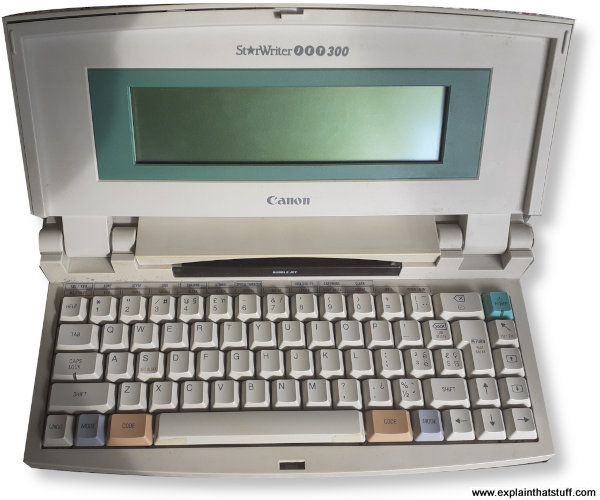
They often have a little LCD display screen and the letters
you type appear on there first. You can easily correct your mistakes on
the display before printing anything out. Some electronic typewriters
(like the popular Canon Starwriter series) have a large internal memory
and a screen big enough to show about eight or ten lines of text. You
can type several pages of text into the memory
and play around with the formatting, just as you can on a computer.
When you're finally satisfied with what you've written, you can print
out the text or save it on a floppy disk.
Photo: The Canon Starwriter: a typical electronic
typewriter.
This model dates from the mid-1990s.
There's no ribbon in this one. Behind the LCD display,
there's a modern inkjet printer.
Many more people have computers these days and hardly anyone uses
mechanical typewriters. Indeed, now
speech recognition
is so advanced, some people don't even use keyboards! But typewriters were
crucially important to the development of personal
computers. The whole idea of a personal computer (a machine into which
you type "input" and wait for written "output" to appear on the screen) is
essentially based on a typewriter. You sit at a keyboard and peck away,
one letter at a time. If you're using a word processor, what you see on
the screen—letters slowly appearing and moving toward the right of the
page as you type—is exactly what you would have seen on the paper in a
typewriter.
Why do keyboards have that strange QWERTY layout?
So, back to the mystery we started with: why are the keys on a
typewriter or computer keyboard arranged in such a strange way? Why not
in
a much more sensible fashion? If you've ever typed quickly on a
mechanical
typewriter, you'll know the reason: the type hammers move up and down
so quickly that they can collide and jam together. Then you have to
reach into the guts of the machine to disentangle them, getting ink and
oil all over yourself in the process. To reduce the risk of that
happening, the designer of the first popular typewriter,
Christopher Latham Sholes (1819–1890), rearranged the keyboard so letters often-used were spaced widely apart. For example, if you type the word P-R-O-B-A-B-L-Y
very quickly, your fingers have to keep leaping from one side of the
keyboard to the other as you go from one key to the next. That gives
each type hammer time to fall back down and get out of the way of the
next hammer that's about to rise up, reducing the risk of a jam. Now
computer keyboards are entirely electronic, there's no reason at all to
keep the QWERTY keyboard layout. We keep it
because most people know it—and for no other reason. It's a charming
quirk of history—and long may it remain so!
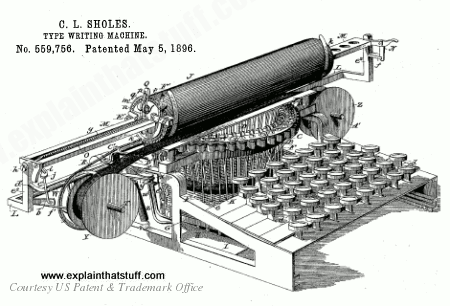
Artwork: Modern typewriters are recognizably descended from the typewriter patented by Christopher Latham Sholes in 1896. You can see the keys at the front, the typehammers arranged in a circle underneath the carriage, and the spools of ribbon on the extreme left and right.
Artwork from US Patent 559,756: Type-writing machine by Christopher Latham Sholes courtesy of US Patent and Trademark Office.
That's just a patent sketch; in reality, early typewriters looked something like this (a cut-down model with only about 20 keys. Look closely and you can see pushing down on the crude keys would pull down on those thin wire levels, which flipped the type hammers up against the paper, normally wrapped around the cylinder on the top.
Photo: Model of an early typewriter (similar to the Latham Sholes
design). Photo by Harris & Ewing courtesy of Library of Congress, Prints and Photographs Division.
Where can I download a typewriter font for my computer?
You'd be surprised how many people want their multi-thousand dollar laser printers to produce grubby, shoddy, typewritten print that resembles an antique typewriter:
How do you do it? Simple! You just need to install a typewriter font
on your machine. That means downloading a font (a fairly small file,
often with filename .TTF, which stands for True Type font) and installing it on your computer
(in Windows, you do this just by clicking on the file).
Where can you download a typewriter font?
Nip over to the Open Font Library and download GNUTypewriter for free; alternatively, search for "typewriter" on commercial sites such as MyFonts.com and FontShop.com and you'll find dozens more to choose from.
On Google Fonts, typewriter-like fonts include
Syne Mono.
If you prefer something cleaner but still classically typewriter-like—a bit more like the output from
an electric typewriter—try a monospace type such as a variant of courier.
Five reasons to still use a typewriter by Gerry Holt, BBC News Magazine, 20 November 2012. Is it traditional, cool, practical, or retro to go back to typing?
Click, Clack, Ding! Sigh ...
by Jessica Bruder. The New York Times, March 30, 2011. Simplicity, freedom from online distraction, and a commitment to what you're writing—a few of the advantages the digital generation has discovered in analog typewriters.
A Typewriter Is a Terrible Thing to Waste by Paul Wallich. IEEE Spectrum, 28 February 2011. Does your computer need a new keybaord? A manual typewriter isn't the most obvious solution, but it's certainly an option for ingenious hackers.
Why typewriters beat computers by Neil Hallows, BBC News, 30 May 2008. Why some people (including a number of famous writers) still prefer typewriters over computers.
Digital world has feet on ground by Bill Thompson: BBC News, 18 November 2009. A thoughtful British technology commentator muses on the shift from typewriters to computers.
Books
The Typewriter Sketchbook by Paul Robert. Lulu, 2007. A great book about early typewriter history produced by The Virtual Typewriter Museum (see above).
Antique Typewriters: From Creed to QWERTY by Michael Adler. Schiffer, 2007. An illustrated history with detailed information about old makes and models that will appeal to collectors and enthusiasts.
The Iron Whim: A Fragmented History of Typewriting by Darren Wershler-Henry. Cornell University Press, 2007. Absolutely not a history of typewriters, but more a guide to how writing with typewriters became a part of our culture. Not a book to go to if you want to study the history of typing machines.
Patents
For the more technically minded among you, these three patents show how Christopher Latham Sholes' ideas evolved and improved during the 1880s and 1890s:
US Patent 559,756: Type-writing machine by Christopher Latham Sholes. Issued May 5, 1896. In the third patent, we can see the typewriter taking on a distinctly modern form: the mechanism now looks very similar to the "modern" portable typewriter described earlier in this article.
And here are some fascinating later patents:
US Patent 681,957: Electric type Writer by George Ennis. Issued September 3, 1901. One of the first electrically controlled typing machines and the earliest I've found on the USPTO database. This machine predates the Blickensderfer, which Wikipedia writers have (wrongly) suggested was the first electric typewriter. The Ennis patent was originally filed on March 24, 1900.
US Patent US2,684,745: Teletypewriter by Edwin Blodgett, IBM. Issued July 27, 1954. A forerunner of the fax machine that could send and receive messages between two different locations. This is a relatively late example.
US Patent 2,919,002: Selection mechanism for a single printing element typewriter by Leon Palmer. Issued December 29, 1959. The main patent covering IBM's classic Selectric ("golfball") typewriter. Although electrically controlled, this machine was a work of mechanical genius: the golfball is controlled by an intricate pulley and tape mechanism.
Please do NOT copy our articles onto blogs and other websites
Articles from this website are registered at the US Copyright Office. Copying or otherwise using registered works without permission, removing this or other copyright notices, and/or infringing related rights could make you liable to severe civil or criminal penalties.