Ever wanted to run your own
TV station? A webcam lets you do just
that. With one of these tiny, bug-eyed cameras hooked up to your
computer, you can broadcast
pictures of yourself or your home to the
entire world! A webcam is a bit like a digital
camera and works much the same way. But unlike a digital camera,
it's designed to make relatively compact digital photos that are easy
to upload onto Web pages or send
across the Internet. It all sounds simple enough,
but how do webcams actually work? Let's take a closer look!
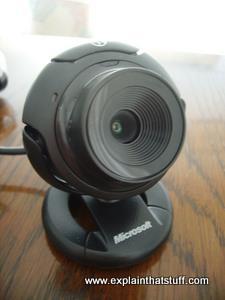
Photo: This Microsoft LifeCam VX-1000 webcam can stand on a table or clip to the screen of a laptop. It has a built-in microphone and a long
USB cable carries both picture and sound
to your computer. Some laptops and netbooks have built-in webcams. That sounds like
a good idea in theory but, again, it limits you to showing pictures of what is directly in
front of the computer. Other popular cams are made by Logitech, Creative, Hue, and TeckNet.
A webcam is a compact digital camera you can hook up to your computer to broadcast
video images in real time (as they happen). Just like a digital camera, it captures
light through a small lens at the
front using a tiny grid of microscopic light-detectors
built into an image-sensing microchip (either a charge-coupled device (CCD)
or, more likely these days, a CMOS image sensor).
As we'll see in a moment, the image sensor and its circuitry converts the
picture in front of the camera into digital
format—a string of zeros and ones that a computer knows how to handle.
Photo: Unlike the webcam above, which you can focus by twisting its lens, this Microsoft LifeCam VX-800 has a preset focus. If you look closely, you can just see the power indicator light (top left, not currently lit up) and the microphone (top right). The stand can simply rest on a table or open up to clip on top of your laptop.
Unlike a digital camera, a webcam has no built-in memory chip or flash memory card: it doesn't need to "remember" pictures because it's designed to capture and transmit them immediately to a computer. That's why webcams have USB cables coming
out of the back. The USB cable supplies power to the webcam from the computer and takes the digital information captured by the webcam's image sensor back to the computer—from where it travels on to the Internet.
Some cams work wirelessly and don't need to be connected to a computer: typically they use Wi-Fi to transmit their pictures to your Internet router, which can then make them available to other machines on
your home network or, using the Internet, to anyone, anywhere in the world.
How does an image sensor chip work?
All webcams work in broadly the same way: they use an image sensor chip to catch moving images and convert them into streams of digits that are uploaded over the Internet. The image sensor chip is
the heart of a webcam—so how does that bit work? Let's take a webcam apart and find out.
Take the outer case off a webcam and you'll find it's
little more than a plastic lens mounted directly
onto a tiny electronic circuit board underneath. The lens screws in and out
to increase its focal length, controlling the focus of your cam:
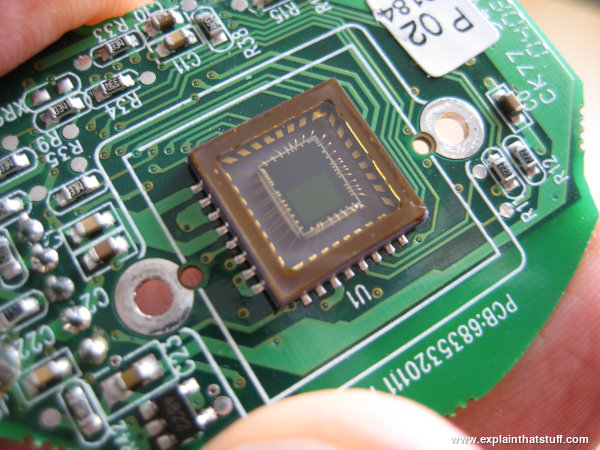
Now take the lens off and you can see the image sensor (CCD or CMOS chip): it's the
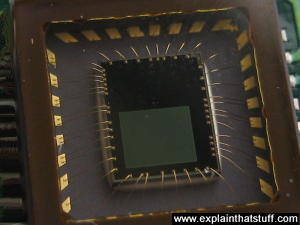
square thing in the middle of this circuit. Only the tiny, green-colored central part is light-sensitive: the rest of the chip is concerned with connecting the light detector to the bigger circuit that surrounds it:
Here's a closeup:
Webcams versus digital cameras
So the image sensor is the "electronic eye" of a webcam or a digital camera. It's a
semiconductor chip made of millions of tiny, light-sensitive squares arranged in a grid pattern. These squares are called pixels. Basic webcams use relatively
small sensors with just a few hundred thousand pixels (typically a grid of 640 × 480.
Good digital cameras use sensors with many more pixels; that's why cameras are compared by how many
megapixels (millions of pixels) they have.
A basic webcam has about 0.3 megapixels (300,000, in other words), while a
digital camera with 6 megapixels has over 20 times more—probably arranged in
a rectangle with three thousand across and two thousand down (3000 x
2000 = 6 million). A better camera rated at 12 megapixels
would have a 4000 x 3000 pixel sensor. Take a photo the same size with those two
cameras and the 12 megapixel one is going to give you 1000 more dots
horizontally and 1000 more vertically—smaller dots giving more detail
and higher resolution. A single pixel in a really good sensor is
something like 10 micrometers (10μm) in diameter (5–10 times smaller
than the diameter of a typical human hair)!
How does an image sensor convert a picture into digital form?
When you take a digital photo or stare into your webcam, light
zooms into the lens. This incoming "picture" hits the image sensor, which breaks it up into individual pixels
that are converted into numeric form.
CCDs and CMOS chips, the two kinds of image sensor, do this job in slightly different ways. Both initially convert incoming light rays into electricity, much like photoelectric cells (used in things like "magic eye" intruder alarms or restroom washbasins that switch on automatically when you put your hands under the faucet). But a CCD is essentially an analog optical chip that converts light into varying electrical signals, which are then passed on to one or more other chips where they're digitized (turned into numbers). By contrast, a CMOS chip does everything in one place: it captures light rays and turns them into digital signals all on the one chip. So it's essentially a digital device where a CCD is an analog one. CMOS chips work faster and are cheaper to make in high volume than CCDs, so they're now used in most low-cost cellphone cameras and webcams. But CCDs are still widely used in some applications, such as low-light astronomy.
Whether images are being generated by a CMOS sensor or a CCD and other circuitry, the basic process is the same: an incoming image is converted into an outgoing pattern of digital pixels. Let's just refer to "the image sensor" from now on (and forget about whether it's a CCD and other chips or a CMOS sensor).
First, the image sensor measures how much light is arriving at each pixel. This information is turned into a number that can be stored on a memory chip inside the camera. Thus, taking a digital photograph converts the picture you
see into a very long string of numbers. Each number describes one pixel in
the image—how bright or dark and what color it is.
Step by step
Light from the object (in this case, a bicycle) enters the camera lens.
The image sensor inside the camera splits the image up into millions of
pixels (squares). An LCD display on the back of the camera shows you
the image that the sensor is capturing—not an image of the object seen
through a series of lenses (as with a conventional camera), but a
redrawn, computerized version of the original object displayed on a screen.
The sensor measures the color and brightness of each pixel.
The color and brightness are stored as binary numbers (patterns of zeros and ones) in the camera's
memory card. When you connect your camera to a computer, these numbers are transmitted instantly down the
wire.
Who invented image sensors?
The CCD was invented in fall 1969 by Canadian-born Willard S. Boyle (1924–) and American George E. Smith (1930–), two colleagues working at Bell Laboratories (a famous American research center in New Jersey responsible for all kinds of amazing inventions, most famous of which is the transistor). Boyle and Smith were trying to develop a new kind of computer memory—in their notes, originally
called a charge "bubble" device—but what they actually invented proved far more useful for capturing and storing images in digital form.
Photo: Albert Einstein—ultimate father of the webcam? Photo courtesy of
US Library of Congress.
The science behind the CCD (turning light energy into electrical energy) dates back much further—to 1905. Known as the photoelectric effect, it was the first major scientific discovery by Albert Einstein (1879–1955). Einstein showed how a light beam could give up its energy when it hit the surface of a material, knocking out electrons that would then form an electric current—and a quantity of electrical energy that could be related directly to the frequency of the incoming light. It was for this early piece of work (and not his much more famous later work on relativity) that Einstein was awarded the Nobel Prize in Physics 1921. Boyle and Smith earned their own place in history almost 90 years later when they won the Nobel Prize in Physics 2009 (shared with fiber-optic pioneer Charles Kao).
Sponsored links
Comparing webcams
Take apart any webcam and you'll end up with much the same bits and pieces: an image sensor
chip, mounted on a circuit board, lurking behind a lens. That doesn't mean that all
webcams are exactly the same or that one is just as good as another. In fact, there
are two key measurements that tell you how well a webcam will perform: resolution
and frame rate.
Resolution
While a good digital camera is designed to capture high-resolution
(finely detailed) pictures, a webcam deliberately captures much lower
resolution (more blurred, grainy, and "pixelated") images. A standard definition webcam makes
images that are about one tenth the size of a typical
digital camera, typically either 320 × 240 or 640 × 480 pixels,
so each uncompressed still frame would be several hundred kilobytes instead of several megabytes.
That means webcam snapshots can be sent over the Internet much more quickly than large digital photos, because there are far fewer bytes to upload and download.
Webcams like this can work effectively even with slow, dialup Internet.
Modern HD (high-definition webcams) make higher-resolution images than older cams (typically either 1280 × 720 or 1600 × 1200), but still use much smaller-sized files than a really good digital camera. Since they're sending much bigger images, they need decent broadband Internet connections.
If you're broadcasting with a webcam, you'll need reasonably good uploading speed (usually 1MBps upload speed or better),
whereas conventional web browsing relies mainly on fast downloading speeds.
Frame rate
The frame rate (also called the refresh rate) is the number of frames per second (FPS) that a webcam
can handle. Lower-quality cams manage about 24 frames per second, while better ones might
reach 50–60. The Microsoft VX-1000 and VS-800 cams in the photos up above come in at a pretty average 30 fps with a resolution of 640 × 480.
What kind of frame rate do you need? The higher the rate, the more movement your cam will capture. In practice, even a low frame rate is good enough for video chat (since you're mostly sitting still staring at the camera) and if all you're doing is uploading still webcam images to a web page (once a minute or so), the frame rate is pretty much irrelevant.
Striking a balance
If your Internet connection is too slow, you won't be able to manage more than a very modest frame rate
(perhaps just 5–10 frames per second or maybe not even that): even then, you might see a "laggy" image that isn't synchronized with the sound you hear or a "jerky" image with sudden changes in movement. If a high frame rate is important, switching to a lower resolution (or perhaps using black and white instead of color) might cure the problem.
You could also try using more lighting (with an angled desk lamp) and simplifying the picture that you're transmitting (put up a white sheet as a plain background behind you or film yourself against a plain wall and wear plain clothes, not crazily patterned ones). If you can reduce the amount of information being transmitted in each frame, you should, in theory,
be able to send more frames per second with your limited bandwidth.
In practice, then, you need to strike a balance between resolution and frame rate according to the limited speed of your connection. With a very fast broadband connection, you should be able to manage both a high frame rate and a high resolution.
What can you do with a webcam?
Most of us have smartphones with built-in cameras, and easy-to-use video chat
apps like Zoom and FaceTime (or WhatsApp and Snapchat if you prefer), so why on Earth would you want a
separate webcam?
Some people still prefer to do things the old fashioned way. With a smartphone,
all you can really do is speak and chat; with a webcam, running on a desktop computer, you can also type,
exchange files, share your desktop, and other things that may be tricky on a mobile. So there's still very much a place
for old-style webcams in the age of Android smartphones and iPhones.
Webcams are also handy if you want to publish a frequently updated still image of a particular place for others to view on the Internet. For example, a zoo might publish live pictures from its zebra or giraffe house. Webcams are relatively
inexpensive—much cheaper than smartphones—so you're going to care much less if they're damaged
or stolen.
The third reason is for security. Maybe you want to monitor your home while you're on
vacation, check your dog is fed and watered, or keep an eye on a sick or elderly relative.
Webcams let you do all these things. Wireless cams, connected to your home router, can
be especially discreet and convenient.
And one final reason: a webcam, connected by a cable or wireless, can
show you things a smartcam can't. Want to cut your own hair? An easy way to see round the back is to place
a webcam behind you and watch the screen as you chop. You can't really do that with a phone, where
the screen and the camera are built into a single unit.
Video chat
To chat to someone online, you both need a device with a webcam
(or a smartphone with a built-in cam) and you both need to be running the same
video chat program on your computer or mobile.
Skype, the best known chat program,
runs on pretty much any type of computer or mobile device
(though it no longer runs on older machines with operating systems like Windows XP
or old versions of Linux). FaceTime works only
on Apple (iOS) devices. And Google Hangouts runs on desktop machines, Apple (iOS) devices,
and Android mobiles.
Video chat programs work just like still webcams—only they're
uploading photos constantly. Suppose I am video chatting with you. My
camera captures a picture of me, turns it into digital format, and
sends it my computer. The chat program on my machine
"streams" the image
information across the Internet to your computer. The chat program on
your machine receives the image information and converts it back into a
picture, which it displays on your screen. Meanwhile, your camera is
doing exactly the same thing with a picture of you and sending it in
the opposite direction. This two-way process happens constantly, so
each of us gets a constantly updated picture of the other. To speed
things up, video chat programs like Skype make a direct connection
between your machine and mine, bypassing centralized servers. This very
efficient way of using the Net is called
(VOIP) Voice Over Internet Protocol and is
an example of what's known as P2P (peer-to-peer) networking..
Webcam stills
Suppose you want to broadcast images of your garden on a website and
update them at regular intervals. You can do that with a webcam. You
simply point the cam at your garden, hook it up to your computer, and
install a special piece of software. The software captures an image
from the cam every five minutes (or at some preset interval) and copies it onto your website using a
simple process called FTP (file-transfer protocol).
Every time a new image is uploaded, it replaces the previous one on
your website. When people look at your site, they see the latest image
that your cam has uploaded. Most people design their cam pages so they
do what's called a "meta refresh" (automatically reload) every few minutes. That ensures
they're always showing the latest image.
Here are some examples of webcams that work this way:
Skyline: From the Trevi Fountain in Rome to the skyline of New York City, this site offers live views of tourist "honeypot" sites from around the world.
Photo: Do my plants need watering? If you have an old smartphone or tablet you no longer use, it's easy to set it up as a Wi-Fi-connected security camera you can monitor remotely. There are quite a few apps that will help you do this (search your favorite app store for "home security monitor").
Thanks to the Internet, lots more people are getting interested in
smart home technology, which lets
you monitor and control things like your home heating, lighting, and appliances
using smartphone apps (or a simple web interface you can log on to) while you're away.
Monitoring what's happening at home with a webcam used to be quite tricky. You needed
both a PC (which had to be running all the time) and a webcam, which you had to set up to upload intermittent still photos (just as though you were setting up a still webcam in a zebra house). Now it's much easier. All you need is a Wi-Fi enabled webcam that can automatically upload images using your wireless router. It doesn't need to be plugged into a computer and you don't need any complicated software either. Some Wi-Fi cams will stream live images; some will record and store them for a few days or weeks in flash memory; still others will upload them to the cloud, where you can browse or watch them later. Home monitoring and security Wi-Fi cams are made by Dropcam (now a part of Google's Nest), Tenvis, Simplicam, Oco, and many others, and tend to be quite a bit more expensive than the kind of basic
cams you get for online chat.
Can I use my digital camera as a webcam?
If you've got a digital camera already and a webcam is essentially the same thing,
it might occur to you to use your ordinary cam as a webcam. Some digital cameras
even have a built-in webcam button or mode making it very easy. For others, you'll
need to find out if there's a driver available (that's a small file that tells
your computer how to use a plug-in device in a certain way). Sometimes people write
their own programs and drivers and make them available online for others, so Googling something like
"use canon ixus as webcam" will often bring up helpful results.
?
However, there's one thing you do need to be very wary of. A USB connection contains a 5-volt power
supply as well as a data connection to and from your computer. Plug a digital camera into a USB
socket on your PC and it will draw power the whole time it's connected. Digital cameras are not
normally meant to be plugged into computers for more than a minute or two at a time (while
you're uploading your photos). Leave a camera plugged in for a long time (half an hour or
a couple of hours) while you're using it as a webcam and it can heat up considerably,
either damaging the camera or overcharging the batteries. Consider that a good digital camera costs
perhaps 10–50 times more than a basic webcam and you'll see what a risk you're taking.
The message is simple: if you plan on using a webcam regularly, or for any length of time,
buy a proper USB webcam. They're not expensive (you can get one for less than $20/£10)—and you'll save
damage to your digital camera, which probably was expensive!
Moving Images: From Edison to the Webcam by
John Fullerton, Astrid Söderbergh Widding (eds). Indiana University Press, 2000. A series of cultural and technological essays that put webcams in their wider historical context.
How to Do Everything with Online Video by Andrew Shalat. McGraw-Hill Professional, 2007. Covers all aspects of online video, including how to record, upload, and share videos on your website.
Handbook of CCD astronomy by Steve B. Howell. Cambridge University Press, 2006. As the title suggests, this book is mainly about using CCDs for making images of space, but the first half of it (about 100 pages or so) is all about CCDs generally (the different types, the quantum physics of how they work, and so on), so it's worth a look if you're interested in CCDs for other reasons.
Mark Zuckerberg tapes over his webcam. Should you? by Alex Hern. The Guardian. June 22, 2016. Security experts seem to agree with the Facebook supremo that covering your cam is a good idea (when you're not using it).
Why is everyone covering up their laptop cameras? by Danny Yadron. The Guardian. June 6, 2016. Fears of covert surveillance prompt many people to stick tape over their cameras, but are they just being paranoid?
Software turns webcams into
eye-trackers by Brown University. EurekAlert! June 1, 2016. Eyetracking studies are an essentially part of usability testing; now you can do them with a simple webcam and a bit of JavaScript code.
Webcams See All (Tortoise, Watch Your Back) by Quentin Hardy. The New York Times. January 7, 2014. People worry about CCTV and surveillance, but apparently not about webcams.
Intimacy on the Web, With a Crowd by Matt Richtel. The New York Times. September 21, 2013. Explores the webcam modeling industry—and the people who earn a living through it.
Nobel Prize in Physics 2009: Masters of Light: Explains the contributions of Willard Boyle, George Smith, and Charles Kao to our modern digital world. Includes a copy of
a page from Boyle and Smith's lab notebook where they talk about their discovery of the "charge bubble device" (as it was originally called).
CCD versus CMOS: A good, clear explanation of the key differences between CMOS and CCD image sensors from a leading manufacturer.
How to Use Your Camcorder as a Webcam: Another Instructable, this one shows how to send pictures from a camcorder to your computer's webcam software.
Why Do Birds Fly in a V-formation?: A very clever but relatively simple science-fair project from Science Buddies in which you measure the drag on model birds using a webcam.
DIY Street-View Camera by Roy D. Ragsdale. IEEE Spectrum, October 4, 2009. You can make your own Google Streetview-type images—and here's how.
Please do NOT copy our articles onto blogs and other websites
Articles from this website are registered at the US Copyright Office. Copying or otherwise using registered works without permission, removing this or other copyright notices, and/or infringing related rights could make you liable to severe civil or criminal penalties.