It's amazing when you think about it:
you can store a movie several hours long on a shiny piece of plastic no bigger than your hand!
Although compact discs (CDs) have been around for more than 30 years,
they are still one of the most popular ways of storing music and
computer data. In the mid-1990s, CDs evolved into
digital video/versatile discs (DVDs), which look and work in a similar way but
can store about seven times more. And now we have Blu-ray™, which
can store six times more than a DVD—or about 40 times more
a than CD! Have you ever wondered how CDs, DVDs, and Blu-rays actually work?
Let's take a closer look!
Note: Throughout this article, we'll talk about CDs. But almost
everything about CDs also holds true for DVDs and Blu-ray discs.
A compact disc is a thin, circular disc of metal and
plastic about 12cm (just over 4.5 inches) in diameter. It's actually made of
three layers. Most of a CD is made from a tough, brittle plastic called
polycarbonate. Sandwiched in the middle there is a thin layer of
aluminum. Finally, on top of the aluminum,
is a protective layer of plastic and lacquer. The first thing you notice about a CD is that it is
shiny on one side and dull on the other. The dull side usually has a label on it
telling you what's on the CD; the shiny side is the important part.
It's shiny so that a laser beam can bounce
off the disc and read the information stored on it.
Photo: A small portable compact disc player made by Technics. Gadgets like this have now largely been superseded by MP3 players such as iPods, which are much smaller and lighter and pack lots more music into the same space by compressing it digitally. Read more about this in our main article on MP3 players.
How CDs use optical laser technology
Until CDs were invented, music was typically stored on vinyl (plastic) LP
(long-playing) records and cassette tapes. LPs scratched easily, while
tapes could stretch and distort and sometimes snapped or seized up
entirely. Both of these ways of storing music were primitive compared
to CDs. LPs were played on turntables with a moving arm that bounced
along a groove in the plastic, reading back the music as it went.
Record players (or gramophones, as they were sometimes known) used mechanical
technology for recording and playing back sound: the moving arm turned
the bumps in the plastic into sounds you could hear. Cassette tapes
(used in such things as the original Sony Walkmans) worked a different way. They
stored sounds using magnetic technology.
When you put a cassette into your Walkman, a small electric motor dragged the tape
past a little electromagnet. The electromagnet detected the pattern of
magnetism on the tape and an electronic
circuit changed this back into
the sounds that fizzed and popped in your headphones.
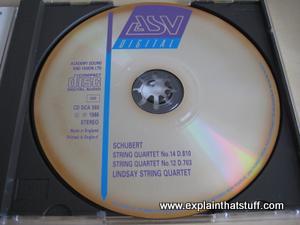
Photo: Great music, rotten CD! CDs were billed as virtually indestructible, but some early ones have fallen victim to a problem called disc rot,
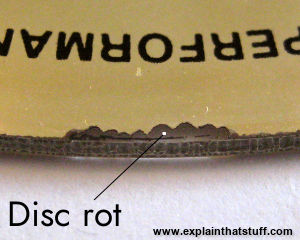
which comes in various flavors. Some rotten CDs slowly turn brown (a problem known as "bronzing"); in others, bits of the reflective surface pit or disappear, eventually making them unplayable. Often the last track, which is nearest the exposed edge of a compact disc, is affected first.
Photo: A close-up of the rot on the bronzed edge of a CD, where the metal has started to disintegrate and fall away. This disc will eventually become unplayable.
With the invention of CDs, people finally had a more reliable way of
collecting music. CD players are neither mechanical nor magnetic but optical:
they use flashing laser lights to record and read back information from
the shiny metal discs. One of the main problems with LPs and
cassettes was the physical contact between the player and the record or
tape being played, which gradually wore out. In a CD player, the only
thing that touches the CD is a beam of light:
the laser beam bounces harmlessly off the surface of the CD, so the disc itself should (in
theory) never wear out. Another advantage is that the CD player can
move its laser quickly to any part of the disc, so you can instantly
flip from track to track or from one part of a movie to another.
Sponsored links
How CDs are recorded and played back
Note: In the explanations that follow, I'm deliberately going to simplify how
CDs store music as patterns of zeros and ones. It's much more complex than I'm going to make it seem,
and it's beyond the scope of an introductory article like this, but I will
briefly describe what really happens at the very end.
LP records stored music as bumps on the surface of plastic, while
cassettes stored it using patterns of magnetism. These are called
analog technologies, because the sound is stored as a
continuously varying pattern (of bumps in the plastic of a record or fluctuations in
the magnetism on a cassette tape). In a CD, music (or other
information) is stored digitally (as a
long string of numbers).
After the music has been recorded, it is converted into numbers by a
process called sampling. Almost
50,000 times a second (44,100
to be exact), a piece of electronic equipment measures the sound, turns
the measurement into a number, and stores it in binary format (as a
pattern of zeros and ones). The sampling process turns a CD track
lasting several minutes into a string of millions of zeros and ones.
There's another bit of processing that goes on after sampling (technically, known as modulation—I'll
talk about it very briefly, further down this page).
But, in very simple terms, the sampled data is essentially the information stored on your CD.
In other words, there is no (analog) music on a CD at all—just a huge long list of (digital) numbers.
Illustration: An ordinary CD is a sandwich of plastic (in which bumps have been pressed by a master disc), reflective aluminum, and protective polycarbonate plastic.
CDs are made from an original "master" disc. The master is "burned"
with a laser beam that etches bumps (called pits) into its
surface. A bump represents the number zero, so every time the laser burns a bump
into the disc, a zero is stored there. The lack of a bump (which is a
flat, unburned area on the disc, called a land) represents the
number one. Thus, the laser can store all the information sampled from the
original track of music by burning some areas (to represent zeros) and
leaving other areas unburned (to represent ones). Although you can't
see it, the disc holds this information in a tight, continuous spiral
of about 3–5 billion pits. If you could unwrap the spiral and lay it in
a straight line, it would stretch for about 6 km (roughly 3.5 miles)!
Each pit occupies an area about two millionths of a millionth of a
square meter. That's pretty tiny!
Once the master disc has been made, it is used to stamp out millions
of plastic duplicates—the CDs that you buy and put into your music
player or computer. Once each disc is pressed, it's coated with a thin aluminum layer
(so it will reflect laser light), covered with protective polycarbonate and lacquer, and the label is printed on top.
How a CD player works
So what's going on in your CD player when the disc spins around?
Inside your CD player, there is a miniature laser beam (called
a semiconductor diode laser)
and a small photoelectric cell (an electronic light detector). When you press play,
an electric motor (not shown in this diagram) makes the disc rotate at high speed
(up to 500rpm). The laser beam switches on and scans along a track, with the photocell,
from the center of the CD to the outside (in the opposite way to an LP
record). The motor slows the disc down gradually as the laser/photocell scans from the center to the outside of the disc (as the track number
increases, in other words). Otherwise, as the distance from the center increased, the actual surface of the disk would be moving faster and faster past the laser and photocell, so there would be more and more information to be read in the same amount of time.
The laser (red) flashes up onto the shiny (under) side of the CD, bouncing off the pattern of pits (bumps)
and lands (flat areas) on the disc. The lands reflect the laser light
straight back, while the pits scatter the light.
Every time the light reflects back, the photocell (blue) detects it, realizes it's seen a land, and
sends a burst of electric current to an electronic circuit (green) that
generates the number one. When the light fails to reflect back, the
photocell realizes there is no land there and doesn't register
anything, so the electronic circuit generates the number zero. Thus the
scanning laser and electronic circuit gradually recreates the pattern of zeros and ones (binary digits) that
were originally stored on the disc in the factory.
Another electronic circuit in the CD player
(called a digital to analog converter or DAC)
decodes these binary numbers and converts them back into
a changing pattern of electric currents.
A loudspeaker transforms the electric currents into sounds you can hear (by changing
their electrical energy into sound energy).
Photos: 1) The diode laser and photocell move along a
radial track so they can scan the entire surface of the CD as it
rotates. 2) Here's the diode laser (bottom) and photocell (top) in closeup.
WARNING! Don't try to fiddle with
your CD player to see the laser lit-up inside.
It could damage your eyes or blind you.
All CD players are designed to stop you looking at the lasers by
mistake. Don't ever fool around with them!
Recordable CDs and DVDs
When CDs first became popular in the 1980s,
they were sold purely as read-only audio compact discs (CD-DA,
ones you could play music from but not record onto). It wasn't long
before computer companies realized they could use CDs to distribute
software (programs) very cheaply, and ordinary computer users
soon saw that CDs would be even better if you could write music and
data on them as well as just read from them.
That's how recordable CDs (CD-Rs) came to be developed, but the snag was that they
could only be written on once; you couldn't erase and reuse them.
Soon enough, though, the computer whizzkids developed rewritable CDs (CD-RWs) that you could erase and rewrite any number of
times.
Photo: A CD/DVD writer/rewriter has a much more sophisticated laser read/write head than an ordinary CD/DVD player. Depending on the type of player, the read/write head needs to be able to read ordinary CDs and DVDs, recordable discs, and rewritable discs—so it really needs to be capable of several quite different reading and writing operations.
How does a recordable CD (CD-R) work?
In theory, if you wanted to make ordinary CDs in your own home,
you'd need to install a huge and expensive CD-pressing machine.
Fortunately, you don't need to do this—and that's because recordable
CDs (CD-Rs) work in a completely different way. This time, there are no
pits and lands imprinted on plastic. Instead, in between the protective polycarbonate and the reflective aluminum, there's a layer of dye. Normally the dye is translucent: laser light zooming into the disk from a CD
player will pass straight through it, hit the reflective aluminum, and
bounce straight back down again.
So far so good, but how do we store information on a compact disc like this? A CD-R
writer has a higher-powered laser than normal, which generates heat when
it strikes the disc, "burning" the dye and making a tiny black spot.
Later, when a CD reader aims its laser at that spot, the light is completely
absorbed and doesn't reflect back. This indicates that
a zero ("0") is stored on the disc at that point. In places where the
dye is unburned, the laser light reflects straight back again, indicating that a "1" is stored
on the disc. See where this is going? By
creating areas of "burned" dots, and other places where the dye is left
alone, a CD-R writer creates a pattern of binary zeros and ones that
can be used to store information. Unfortunately, once the dye is "burned" it's permanently transformed: you can't change it back again. And that's why you can only write a CD-R disc once.
Just in passing, we should note that, although CD writers are widely referred
to as CD burners, they do not actually burn things (combust them
with oxygen): they simply use a laser to change the light-sensitive dye.
Illustration: With a CD-R, binary information is stored as "burned" areas (0) and unburned areas (1) in the dye layer sandwiched between the protective polycarbonate and the reflective aluminum.
How does a rewritable CD (CD-RW) work?
Let's say you're charged with the task of developing a type of compact disc
that can be written to or erased over and over again. Clearly you
can't use either of the methods we've discussed so far (the pits and
lands method from read-only audio CDs or the "burned"-dye method used in
CD-Rs). What you really need is a CD made from a substance that can
easily be converted back and forth between two different forms, so it
can be used to store a pattern of zeros and ones, then erased and used
to store a different pattern later on if necessary.
Most of us learned in school that the atoms (or molecules) in
solids, liquids, and gases arrange themselves in different positions,
with atoms in solids tightly locked together. Some solid materials are more complex than this: their
atoms (or molecules) can be arranged in two or more different ways
called solid phases. (Solid carbon, for example, can exist in
very different phases that include graphite and diamond.) That's just what we need to make a CD-RW disc.
Instead of having a layer of dye, a CD-RW has a layer of metallic alloy
that can exist in two different solid forms and change back and
forth between them. It's called a phase-change or phase-shift
material. Sometimes it's crystalline, with its atoms/molecules arranged
in orderly ways, so it's translucent and light can pass straight through it;
other times, its atoms/molecules are jumbled up in a much more random and disorderly form called an
amorphous solid, which is opaque and blocks light. When a CD-RW laser
hits this material, it changes tiny little areas of it back
and forth between the crystalline and amorphous forms. When it
creates a crystalline area, it's making part of the CD reflective and
effectively writing a one ("1"); when it makes an amorphous area,
it's making the CD non-reflective and writing a zero ("0").
Because this process can be repeated any number of times, you can
write and rewrite a CD-RW pretty much as many times as you like!
Illustration: With a CD-RW, binary information is stored as areas of metal alloy that are either crystalline or amorphous. Crystalline areas have a regular structure that lets light pass through to the aluminum area and reflect back down again, thus storing ones. Amorphous areas have a random structure that scatters incoming laser light, so it can't reflect back, thus storing zeros. A CD-rewriter can change the metal alloy on the CD from one form to the other and back again, which is why this kind of disc can be erased and rewritten many times over.
Other types of CDs
CDs were originally used just for storing music. Each disc could
store 74 minutes of stereo sound—more than enough for a typical LP
record. During the 1990s, CD technology also became popular for storing
computer programs, games, and other information. Kodak's PhotoCD system (a way of
storing up to 100 photos on a compact disc), was also launched in the
1990s.
The original form of computer CD was called CD-ROM (CD-Read Only Memory), because most
computers could only read information from them (and not store any
information on them). In those days, you needed a separate piece of
equipment called a "burner" to write your own CDs, which were often
called WORMs (Write Once Read Many). It's now more common for computers
to have CD-R or CD/RW drives for burning their own CDs, although most new computers now have DVD drives
instead.
The difference between CDs and DVDs is the amount of information
they can store. A CD can hold 650 megabytes (million characters) of
data, whereas a DVD can cram in at least 4.7 gigabytes (thousand
megabytes)—which is roughly seven times more. Because DVDs are the same
size as CDs, and are storing seven times more information, the zeros
and ones (or pits and lands) on a DVD have to be correspondingly
smaller than those on a CD. The latest optical discs use a technology called Blu-ray
to store six times more data than DVDs or 40 times more than CDs (see the box
at the bottom for a full explanation).
Photo: CDs introduced us to digital music, but they're now being superseded by MP3 players and digital downloads. Why? Look how hard it is to hold just a dozen CDs in your hand. Even a 20GB Apple iPod MP3 player can hold something like 400-500 CDs worth of music without even blinking—and it fits in your shirt pocket! Having said that, a music track on CD will always sound better than than the equivalent MP3, for reasons we explain in our article on MP3 players and digital music.
More about those zeros and ones
It's nice and easy to explain CDs by saying that pits correspond to zeros and lands to ones, but it's not really true.
The information on a CD is encoded in a much more subtle way that uses complex and clever data encoding techniques, including eight-to-fourteen modulation (EFM) and non-return to zero inverted (NRZI) coding. That sounds extremely technical, but it's not
too hard to understand. EFM essentially just means converting short patterns of data into longer ones (paradoxically) to store them more efficiently with less risk of error. NRZI means that instead of reading individual lands and pits, the laser is looking out for changes between a pit and a land, or long strings of pits and lands, and converting those into ones and zeros instead. So, for example, if it reads a long pit and suddenly comes across a land, that is interpreted as a one. If it reads a land and suddenly comes across a pit, that's also interpreted as a one. On the other hand, unchanging areas of land or pit are both interpreted as zeros.
Artwork: How pits and lands encode zeros and ones on a CD's surface. The transition from pit to land, or land to pit, encodes a one; a length of uninterrupted pit or land encodes a zero.
Why use these sorts of techniques instead of the simple "pit equals zero, land equals one" method I described above? It uses the disc space more efficiently (so we can pack more data on a disc), avoids the need for very short or long pits or lands, and minimizes the importance of bits that get lost due to scratches or dirt (so it helps correct against errors). Unless you're building your own CD player or monkeying around with data communication, you really don't need to know precisely how your data is stored on a CD or DVD, so if you want to think of pits being zeros and lands one, that's a perfectly good approximation to what's happening—and all most of us care to know. (For much more detail, check out the section on Data Encoding in The Compact Disc Handbook by Ken C. Pohlmann, from page 74 onward.)
Who invented CDs?
The technology behind CDs was invented in the late 1960s by James T. Russell (1931–). An avid music fan, he
longed for a sound-recording
system that would reproduce music more exactly than LP records and
cassette tapes. He patented the first ever optical sound recording
system in 1970, refining it over the years that followed. Audio CDs
finally made their commercial debut in Europe in 1982, launched by the
Sony and Philips electronics corporations, and appeared in the United
States the following year. CD-ROMs became popular in the 1990s, when
publishers such as Encyclopedia Britannica, Broderbund, and Dorling
Kindersley released popular "multimedia" encyclopedias containing
written text, sound, pictures, animations, and videos. CD-ROMs are less
popular today, thanks to the World Wide Web (WWW), which makes it
easier to publish and update information instantly and link
together pages from lots of different sources.
How does Blu-ray™ work?
People forget things all the time, but that doesn't really matter
because we have books, computers,
CDs, DVDs, and all kinds of other technologies to help us remember. You
can store 10,000 thick books on a DVD—which is about seven times more
than you can fit on a CD. Imagine that: 10,000 books is about 200
shelves or 6–7 bookcases worth or knowledge. But there's no such thing
as too much information. DVDs may be amazing, but sometimes you need to
store even more information than they can cope with. So thank goodness
for a new kind of disc called Blu-ray, which can store six times more
data (digital information) than even the best DVDs—that's a whopping 50
gigabytes worth!
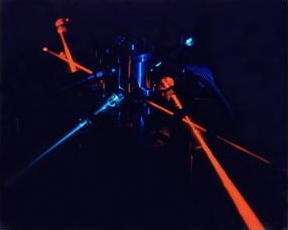
Photo: A blue laser (left) and a red laser (right).
Photo by National Energy Technology Laboratory, Morgantown courtesy of
US Department of Energy.
Why Blu-ray can store more information
Blu-ray discs are exactly the same size as DVDs, which are
themselves the same size as CDs. How do Blu-rays store more than DVDs?
How do DVDs store more than CDs? The answer is simple. If you've ever
had to squeeze a certain amount of text on a single sheet of paper
(maybe to make a poster) and found it difficult to get everything on,
you'll know there's a simple solution: you just make your words a bit
smaller (lower the font size). The same idea works when you're writing
computer data on discs with laser beams. You
can store more on a DVD than a CD by using a laser beam that "writes
smaller". And to read or write a Blu-ray disc, you use a laser to write
even smaller still.
A DVD uses a red laser beam that makes light waves with a wavelength
of 650 nanometers (0.00000065 meters, or less than one hundredth
the width of a human hair). That's considerably shorter than the
wavelength of invisible, infrared light that a CD player uses
(780 nanometers), which is why DVDs can store more than CDs. A Blu-ray
player uses an even more precise laser than a DVD player, with a beam
of blue light shooting out of it instead of red or infared. Blue light
has a much shorter wavelength (about 450 nanometers) than red light so
a blue laser can write things that are far smaller. That means Blu-ray
discs can store movies in a much higher quality format known as High
Definition (HD), store much longer movies on a single disc, or just
store more altogether. If you can fit four, half-hour episodes of Friends on a DVD, you can fit 24 episodes (a
whole series) on a Blu-ray disc.
With a DVD, you use a red laser beam to read and write the information.
The information you write onto the disk can't be smaller than the size of the beam.
By using a much finer blue laser beam, Blu-ray can write smaller and store more information
in the same space.
Is Blu-ray becoming more popular?
Despite a slow start, Blu-ray discs are beginning to gain in
popularity—especially since a rival type of disc, called HD-DVD
(High-definition DVD), fell by the wayside in early 2008. Blu-ray
players are widely available and powerful games machines like the Sony
PlayStation have built in Blu-ray drives. A few years ago, there were
just few hundred Blu-ray discs on the market; today, there are tens of thousands—and many more will follow
in the next few years.
Blu-ray isn't the end of the story, by any means. It's only a matter
of time before cunning engineers develop lasers that can pack even more
data on a disc. But whether we'll actually be using discs at all in the
future is another matter. Most people are already using their broadband Internet connections to
download or stream MP3 music tracks, movies, and TV programs
instead and it may just be a matter of time before disc players disappear altogether.
Then again, people said the same thing about vinyl records when CDs came along—and
that prediction proved untrue.
James T. Russell: A short biography from the Lemelson-MIT inventor program. (Archived page via the Wayback Machine.)
There's also a brief biography on
Wikipedia.
How the CD was developed: This BBC News article from 2007 celebrates the 25th birthday of CD technology with a timeline explaining how the invention progressed.
Blu-ray Disc Demystified by
Jim Taylor et al. McGraw-Hill, 2009. A comprehensive introduction that covers the history of Blu-ray, the technology behind it, disc formats, and practical applications.
The Book of Nero 7: CD and DVD Burning Made Easy by Wally Wang. No Starch Press, 2006. This covers everything you'd possibly want to know about CD and DVD burning, from storing files to designing attractive labels.
The Compact Disc Handbook by Ken C. Pohlmann. A-R Publications, 1989/1992. A technical introduction to CD technology that explains the difference between analog and digital, the basics of digital audio, how CD players work (in much more detail than we go into here), the various CD formats, and how CDs are manufactured. It might seem a dated book now, but it's still very relevant and useful.
The CD-ROM Handbook by Chris Sherman. Intertext Publications, 1994. Another old but very useful resource for CD-ROM developers.
Digitize Your CDs and Reclaim Your Closet by J. D. Biersdorfer. The New York Times, 9 February 2017. I'm not sure I necessarily agree with the advice here—CDs are better quality than MP3s—but it's worth considering if you're short of space.
Sound: Brush aside the idea of painting CDs by Hans Fantel. The New York Times, 3 June 1990. An interesting article from the archive exploring the myth that painting CDs makes them last longer.
At Last, CD Players That D-D-D-Don't Skip by Michael Marriott. The New York Times, 15 March 2000. Sony introduces anti-jump features, called "quick focus search" and "fine access," which stop CD players from jumping when they're bumped or jolted.
Please do NOT copy our articles onto blogs and other websites
Articles from this website are registered at the US Copyright Office. Copying or otherwise using registered works without permission, removing this or other copyright notices, and/or infringing related rights could make you liable to severe civil or criminal penalties.